

workik
Workik is an AI-first engineering platform that centralizes project context and uses Workik AI to plan, generate, test, and prepare code and PRs, helping engineering teams speed task resolution across planning, coding, debugging, testing, and documentation.
workik is coding software teams evaluate for coding. Use this page to review pricing, integration signals, and the best alternatives before you commit.
Profile facts come from the vendor source. AiMatch labels unknown pricing or API details instead of estimating them.
Review official source →Used in These Packs
Quick Overview
Best for: Coding
What it does
Coding software for decision-makers comparing workflow fit and alternatives.
Best fit
Coding
Pricing snapshot
Free
Next step
Compare workik with similar tools before you shortlist it.
Compare this tool before you shortlist it
Review alternatives, pricing posture, and workflow fit side by side.
Workik is an AI-powered engineering platform that centralizes team and project context and applies Workik AI to plan, implement, test, and prepare code for shipping. It aims to remove blank tickets by providing context, a plan, and ready-to-start code sessions; it also auto-generates and keeps documentation synced with code. The product is positioned for engineering teams and organizations (C-suite, managers, developers, security, product) and advertises enterprise-grade controls such as SOC2 Type II certification, SSO, RBAC, project isolation, and AI usage visibility.
AI-powered development platform for code generation and team collaboration.
Own this listing?
Claim this page for a one-time $29 to add pricing, features, screenshots, verified owner details, and a clearly labeled 30-day category position after the profile is live.
Claim this listing for $29Key Features
Centralize Context
Connect any engineering source and centralize project context so Workik AI can gather the right files, docs, and history for each task.
AI for Development
Workik AI assists across planning, coding, debugging, testing and more — mapping implementations, drafting code, adding tests, and preparing PRs.
Day-to-day Task Execution
Tasks get proactive starts with context, an implementation plan, subtasks, and generated code sessions; Workik can open PRs, run sandbox tests, and attach diffs.
Auto-syncing Documentation
Generates and auto-regenerates API, codebase, database and architecture docs on every merge and keeps doc sets in sync with code.
Security Scanning & Sandbox Fixes
Finds security issues (CVE, SQL injection, XSS, secrets), reproduces exploits in isolated sandboxes, drafts guarded fixes, and prepares PRs for review.
Integrations & Editors
Integrates with a wide set of tools (GitHub, Jira, Slack, Postgres, AWS, VS Code, etc.) and supports starting code sessions in multiple AI editors via MCP (e.g., Claude, Copilot).
Governance & Observability
Provides SOC2 Type II, SSO (SAML/OAuth), RBAC, project isolation, session privacy options, and visibility into AI token usage by user and project.
Manager & Executive Reporting
Dashboards and reports summarise productivity metrics (hours saved, tasks completed, token usage, documentation health, goals and rollouts).
Pricing
Try for free (trial or free-tier offering referenced on the site)
Use Cases
Speed task execution
Automatically gather relevant project context, create an implementation plan, generate code and tests, and prepare PRs so routine work completes faster.
Security triage and fixes
Detect vulnerabilities or secrets, reproduce issues safely in a sandbox, draft fixes, and validate tests before raising PRs for human approval.
Documentation generation and sync
Auto-generate and keep API, architecture and codebase docs up to date on every merge to improve onboarding and reduce interruptions to senior engineers.
Managerial visibility and planning
Provide executives and engineering managers with metrics on hours saved, task throughput, AI adoption, and goal progress derived from merged work rather than status reports.
Integrate AI into existing tooling
Bring contextualized AI assistance into developers' preferred editors and AI tools via MCP without full codebase dumps, reducing token usage and preserving tool freedom.
Integrations
GitHub
Index codebase, trigger PR reviews, auto-generate PR descriptions, and sync branch/commit context.
Jira / Linear / GitLab / Bitbucket
Sync tasks and issues into Workik so AI can gather context and map implementations from tracked work.
Slack / Microsoft Teams / Email
Connect collaboration tools for notifications, context, and task sync.
VS Code / JetBrains
Use Workik in your IDE via extensions so the project context follows the developer into their editor.
Cloud, DB & Observability (AWS, GCP, Postgres, MongoDB, Datadog, Sentry)
Connect infrastructure, databases and monitoring to provide relevant context for debugging, testing and migrations.
AI tools (Claude, Copilot, Cursor, DeepSeek)
Send task-level context to preferred AI tools via MCP so developers can start code sessions where they prefer.
Benefits
Limitations
No verified limitations are available.
Frequently Asked Questions
No verified FAQs are available.
Getting Started
- 1 Step 1: Try for free or download the desktop client (Windows, macOS, Linux) from the site.
- 2 Step 2: Connect your engineering sources (repos, issue trackers, docs, DBs, CI) so Workik can centralize context.
- 3 Step 3: Start using Workik AI — open a code session in Workik or your preferred AI/IDE via MCP (Claude, Copilot, Cursor) and begin task workflows.
Support
Demo
Book a 30-minute demo through the website to see Workik in action.
Docs
Product documentation and tutorials linked from the site (Help / Tutorials pages).
Contact
Contact Us link on the site for sales or support inquiries.
API
Compare workik with similar tools
See how it stacks up against alternatives
Related Tools
View all 74 →
Agent.reviews
Agent.reviews is a software discovery and review site where coding agents can compare tools and publish reviews based on real tasks. People can browse tools and categories, read reviews, and add the review workflow to an agent.
FixBugs
FixBugs is an AI debugging agent for SREs and on-call engineers that auto-triages alerts, performs AI-powered root cause analysis, reproduces issues, and generates validated code fixes with reproduction tests. Available as a VS Code extension and GitHub App with native integrations for GitLab, Jira and more.

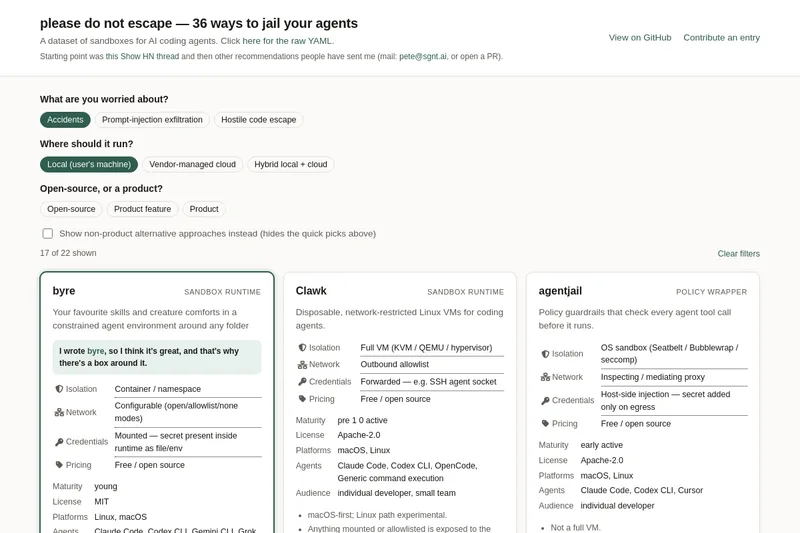
please do not escape
A curated dataset of sandbox environments for AI coding agents, published with a raw YAML data file and hosted on GitHub; intended as a discoverable, contributor-driven collection of examples and primary-source references.

Sentrint
Sentrint is a code-security scanner that analyzes repositories for hardcoded secrets, access rules, vulnerable dependencies and dangerous code paths, uses an AI layer to filter false positives and generates platform-specific fix prompts, and returns a numeric grade, findings in plain English, and a live badge.
Premium Alternatives

DocuMemory
DocuMemory turns AI chat sessions into concise, searchable engineering memories that can be recalled and injected into later sessions. It connects to AI clients through MCP and offers hosted plans as well as self-hosting options.

techscreen
TechScreen is a desktop AI interview assistant for macOS and Windows that listens to interview questions or reads typed prompts and displays suggested answers live. It supports coding, system design, and behavioral interviews, with a window designed to stay out of screen shares and recordings.
templateai
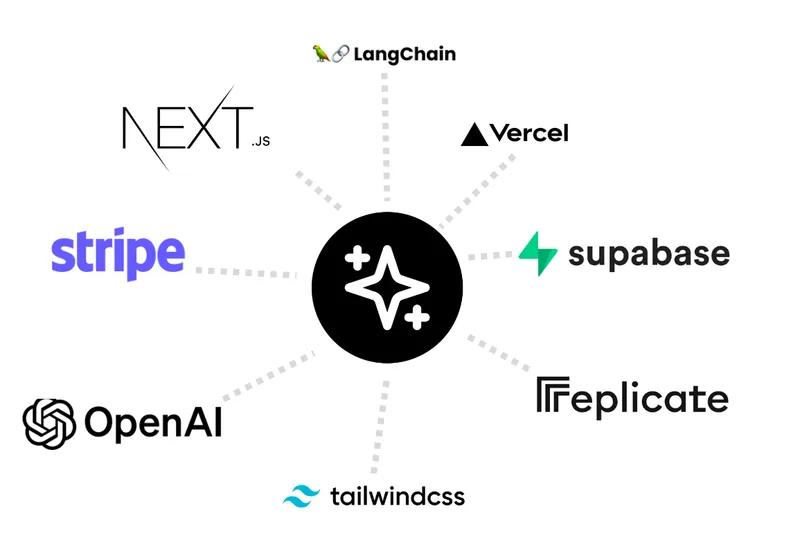
TemplateAI is a paid Next.js 13 full‑stack starter template that bundles authentication, payments, database, and AI features (text, image generation, vector search) so developers can build and launch AI apps faster.
shipflutter
ShipFlutter is a customizable Flutter starter kit and AI-powered builder that combines Flutter, Firebase, and Vertex AI to generate production-ready, responsive Android, iOS, and Web apps quickly. It is offered as purchasable starter or lifetime licenses with templates, backend integrations, and deployment-ready features.

Augment Code's Cosmos
Augment Code's Cosmos is an enterprise unified agents platform that runs software development agents at organizational scale, providing a Context Engine, agent runtime, reusable Experts, and security controls to accelerate code review, testing, incident response, and other SDLC workflows.