YoinkUI
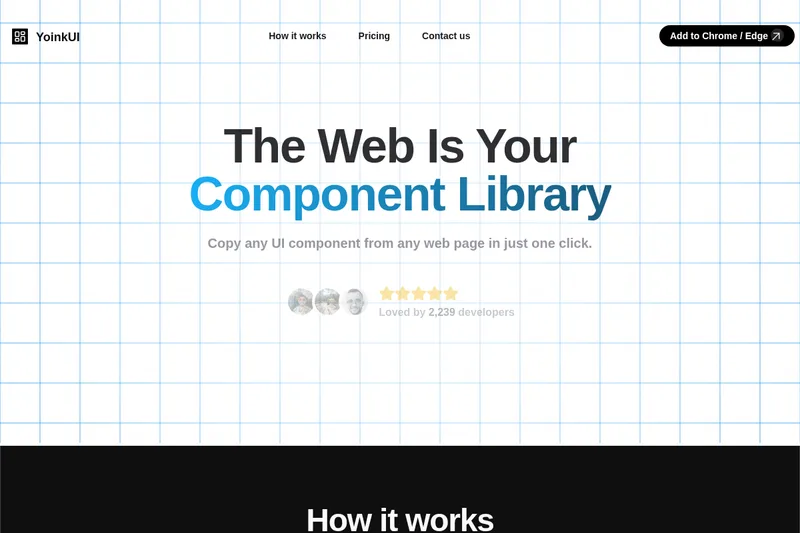
YoinkUI is a browser extension that allows developers to copy any UI component from any web page with a single click, generating clean, ready-to-use React components styled with Tailwind CSS.
YoinkUI is design software teams evaluate for developer tools. Use this page to review pricing, integration signals, and the best alternatives before you commit.
Used in These Packs
Quick Overview
Best for: Developer Tools
What it does
Design software for decision-makers comparing workflow fit and alternatives.
Best fit
Developer Tools
Pricing snapshot
Contact for pricing
Next step
Compare YoinkUI with similar tools before you shortlist it.
Compare this tool before you shortlist it
Review alternatives, pricing posture, and workflow fit side by side.
YoinkUI
YoinkUI is a developer-focused tool designed to bridge the gap between inspiration and creation by enabling users to copy UI components directly from any web page. It simplifies the process of obtaining clean, ready-to-use React components that are styled with Tailwind CSS, ensuring compatibility and ease of integration. The tool removes unnecessary elements and invisible tags, providing only the visible and essential parts of the component. It supports popular frameworks such as React, Next.js, Remix, and Gatsby, making it a versatile addition to any frontend developer's toolkit.
A browser extension that lets you copy UI components from any webpage and converts them into React + Tailwind components for use in your own projects.
Own this listing?
Claim this page to add pricing, features, screenshots, and verified owner details.
Claim this listingKey Features
One-click UI component copying
Copy any UI component from any web page with just one click using the browser extension.
Ready-to-use React components
Generates components that can be instantly used in React, Next.js, Remix, and Gatsby projects.
Tailwind CSS styling
All components are styled with Tailwind CSS, ensuring style compatibility and ease of customization.
Clean code output
Removes invisible elements and unnecessary tags to provide only the visible and relevant component code.
Whole page capture with responsiveness
Allows users to yoink entire web pages and generate responsive UI components by capturing multiple viewport sizes.
Pricing
Claim this listing to add current pricing tiers.
Use Cases
Rapid UI prototyping
Quickly capture and reuse UI components from existing websites to accelerate design and development workflows.
Learning and inspiration
Developers can study and learn from real-world UI components by extracting clean code examples.
Responsive component generation
Create responsive React components by capturing different viewport sizes of a web page.
Integration with modern frameworks
Seamlessly integrate copied components into React, Next.js, Remix, and Gatsby projects.
Integrations
React, Next.js, Remix, Gatsby
Generates components compatible with these popular frontend frameworks.
Tailwind CSS
All components are styled using Tailwind CSS for easy integration and customization.
Benefits
Limitations
Frequently Asked Questions
Which browsers support YoinkUI?
Can I copy entire web pages with YoinkUI?
Are the copied components styled?
Does YoinkUI support frameworks other than React?
Getting Started
- 1 Step 1: Add the YoinkUI extension to your Chrome or Edge browser.
- 2 Step 2: Select the component tool from the toolbar.
- 3 Step 3: Click on the UI component you want to copy on any web page.
- 4 Step 4: Choose where to save your copied component.
- 5 Optional: Use the page tool to capture entire pages and generate responsive components by resizing the browser window to different viewports.
Support
Website
Support and contact information can be accessed via the official website at https://www.yoinkui.com/
API
Compare YoinkUI with similar tools
See how it stacks up against alternatives
Related Tools
View all 126 →Element to LLM
Element to LLM is a browser extension that captures any page element and generates a clean, contextual JSON snapshot of the DOM node, attributes, siblings, and hierarchy, ideal for LLM prompts, UX reviews, and debugging.
Google Labs
Google Labs is an experimental platform by Google showcasing innovative tools and projects, including Whisk, designed to inspire creativity and exploration.
modelslab-ai
ModelsLab is a developer-first API platform offering a wide range of AI and machine learning APIs, including image generation, video creation, audio synthesis, 3D modeling, and uncensored chat, trusted by leading enterprises and used by over 500K active developers.
imandra-ai
Imandra AI offers CodeLogician™, an agentic governance platform that applies neurosymbolic AI to enhance AI coding assistants with rigorous logical reasoning, enabling trustworthy, verifiable software development beyond statistical methods.
Premium Alternatives
200-chatgpt-mega-prompts-for-business
200+ ChatGPT Mega-Prompts for Business is a comprehensive collection of powerful AI prompts designed to enhance marketing, sales, SEO, and productivity for business professionals and marketers.
pitch-patterns
Pitch Patterns is an AI-powered conversation analytics platform that provides real-time insights, coaching, and automated analysis for call centres, sales teams and customer service operations to improve performance and compliance.
Investigalo.com.mx
Investigalo.com.mx provides instant, verified legal background checks for individuals and companies across Mexico, helping users protect themselves from fraud with detailed judicial reports.
Retouchpro
Retouchpro (AI Photo Generator) is a web-based AI image generation and editing platform for creators, influencers, and agencies that produces photorealistic and stylized images in seconds using multiple top image models and community-driven templates.
Tracking Languages
Tracking Languages is a Chrome extension that helps language learners effortlessly track their progress using YouTube videos, available for a one-time payment of £4.99 with no subscriptions or hidden fees.
codiumai
Qodo is an AI-powered code review platform designed to provide enterprise-grade, context-aware code quality checks across the software development lifecycle (SDLC), supporting multi-repo environments and enforcing coding standards, security, and compliance automatically.