
Graph-maker
Graph Maker AI is a free, web-based AI-powered graph and chart creator that converts pasted or uploaded data into presentation-ready visualizations instantly, with editable styles and AI-generated insights.
Graph-maker is business intelligence software teams evaluate for education & research. Use this page to review pricing, integration signals, and the best alternatives before you commit.
Profile facts come from the vendor source. AiMatch labels unknown pricing or API details instead of estimating them.
Review official source →Used in These Packs
Quick Overview
Best for: Education & Research
What it does
Business Intelligence software for decision-makers comparing workflow fit and alternatives.
Best fit
Education & Research
Pricing snapshot
Free from Free
Next step
Compare Graph-maker with similar tools before you shortlist it.
Compare this tool before you shortlist it
Review alternatives, pricing posture, and workflow fit side by side.
Graph Maker AI is a browser-based graph and chart creator that uses AI to analyze, clean, and visualize data instantly. Users can paste data, upload spreadsheets, or enter values manually and generate a professional visualization with no signup required. The product targets a wide audience — from students and educators to marketers, analysts, and founders — and emphasizes speed, ease of use, and editable, exportable output.
The tool provides multiple chart types (line, bar, pie, donut, histogram, scatter, radar, and more), automatic formatting and data-cleaning, and AI-generated insights that explain trends, proportions, distributions, and correlations in the charts.
Graph Maker AI is a free, web-based AI-powered graph and chart creator that converts pasted or uploaded data into presentation-ready visualizations instantly, with editable styles and AI-generated insights.
Own this listing?
Claim this page for a one-time $29 to add pricing, features, screenshots, verified owner details, and a clearly labeled 30-day category position after the profile is live.
Claim this listing for $29Key Features
AI-Powered Data Cleaning
AI helps structure and format uploaded spreadsheets for visualization, reducing manual data preparation.
Automatic Graph Selection & Insights
AI suggests the best visualization type for the data and generates textual insights describing trends, proportions, distributions, and correlations.
Multiple Graph Types
Supports line, bar, horizontal bar, pie, donut, histogram, scatter, radar charts and more, each optimized for common analysis tasks.
Fully Editable Graphs
Customize themes, labels, legends, sizes and other visual details to fine-tune the visualization for reports or presentations.
Real-Time Graph Updates
Graphs update instantly when data is changed, enabling immediate iteration without repeated manual generation.
No Signup Required
The service can be used immediately in the browser without account creation or email verification.
Multiple Export Formats
Download visualizations as high-resolution PNG or JPEG for inclusion in presentations and reports.
Shareable Graph Links
Generate unique shareable links for created graphs for collaboration and embedding.
Pricing
Free to use with no signup required.
Free
Free- No signup required
- Immediate access to AI-powered graph creation
- Export to PNG/JPEG and shareable links
Use Cases
Students & Educators
Create graphs for homework, science projects, lessons, and classroom materials without installing software.
Marketers & Content Creators
Visualize campaign metrics, create social media graphics, and assemble client reports by converting spreadsheets into shareable visuals.
Business Analysts & Data Professionals
Generate publication-ready visualizations (KPI tracking, correlation analysis, performance comparisons) to drop into reports and dashboards.
Small Business Owners & Founders
Produce investor-ready financial charts and business-metric visuals for pitch decks and internal reporting.
Integrations
No verified integration details are available.
Benefits
Limitations
No verified limitations are available.
Frequently Asked Questions
No verified FAQs are available.
Getting Started
- 1 Step 1: Add data by pasting it, uploading a file, or entering it manually (include column headers for best results).
- 2 Step 2: Click "Generate Chart" or the equivalent action to let the AI create the visualization.
- 3 Step 3: Customize the graph appearance, view AI-generated insights, then export as PNG/JPEG or generate a shareable link.
Support
Docs/Blog
Blog and resources are available on the site for guidance and examples (site includes a Blog and Resources section).
Contact page
A Contact link is provided in the site footer for inquiries and support.
API
Compare Graph-maker with similar tools
See how it stacks up against alternatives
Related Tools
View all 195 →
DeepSQL
DeepSQL is a self‑hosted, 24/7 automated DBA and data engineering assistant that monitors database workloads, optimizes slow queries, and ships BI dashboards. It provides a built-in agent, CLI/MCP server, and Slack integration to let teams query, analyze, and put databases on autopilot while keeping data inside their VPC.
Strata
Strata is a business intelligence platform combining governed semantic modeling, self-service dashboards, AI analytics agents, and federated OLAP routing. It helps data teams and business users explore warehouse data while keeping queries grounded in a governed model.

Tiny React charts that fit in a line of text, zero deps
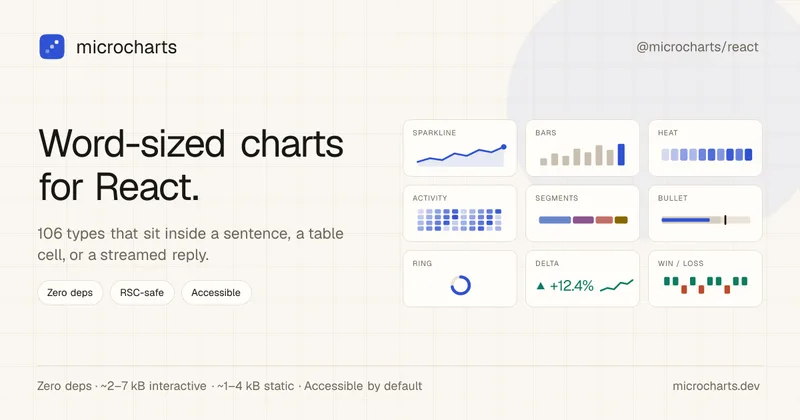
microcharts is a zero-dependency React library of word-sized charts and sparklines (106 chart types) designed to fit inside a sentence, table cell, or streamed assistant reply. It emphasizes tiny bundle size, accessibility, theming, and AI-friendly machine-readable surfaces.


Data Storytelling Platform
Datastory is an AI-assisted data visualization and storytelling platform for turning uploaded, linked, or catalog data into annotated charts and publishable narratives. Users can share work as standalone links, website embeds, or high-quality images.

VisiScan
VisiScan is an AI visibility scanner that runs live queries across ChatGPT, Claude, Perplexity and Gemini to show whether AI answer engines name your business, who your competitors are in AI answers, and provides prioritized, ready-to-publish fixes to improve AI visibility.
Premium Alternatives

Prisync
Prisync is an AI-powered competitor price tracking, monitoring, and dynamic pricing SaaS that helps ecommerce sellers, brands and suppliers monitor competitor prices across channels (Shopify, Amazon, Google Shopping, marketplaces), enforce MAP, and automate price adjustments to optimize profitability.
Usesaaskit
useSAASkit is a Next.js and React Native SaaS boilerplate that bundles AI-ready code (Vercel AI SDK), authentication, multi-organization support, admin tools, billing, marketing pages, analytics and i18n to help founders launch AI-powered SaaS and mobile apps quickly.
Jeda.ai
Jeda.ai is a patented Visual AI Workspace that combines multi-LLM reasoning, 300+ analytical frameworks, and an infinite collaborative canvas to transform prompts, documents, and datasets into framework-grounded visual outputs (matrices, mind maps, flowcharts, infographics) for teams and enterprises.

Helium 10
Helium 10 is an e-commerce seller software suite for researching products and keywords, optimizing listings, managing operations, and analyzing advertising and sales across Amazon, Walmart, and TikTok Shop. Its Helium AI agent and MCP connection help sellers ask questions about their business and use Helium 10 data in external AI tools.

Documentpro
DocumentPro is an API-first document intelligence platform that extracts structured data from invoices, purchase orders, tax forms and other documents for embedding into software platforms; it emphasizes fast integration, AI-powered extraction, and maintenance-free production operation.


Predict Expert AI
Predict Expert AI is a B2B-focused AI company that builds tailored AI models, web/mobile apps, chatbots, automation workflows, forecast models and API integrations to deliver generative and predictive intelligence and real-time operational insights for businesses.
