

Transkriptor
Transkriptor is an AI-powered transcription platform that converts audio and video to text in 100+ languages, provides meeting summaries, speaker diarization, sentiment analysis, and integrates with conferencing and productivity tools for both individual and enterprise use.
Transkriptor is transcription software teams evaluate for transcription. Use this page to review pricing, integration signals, and the best alternatives before you commit.
Profile facts come from the vendor source. AiMatch labels unknown pricing or API details instead of estimating them.
Review official source →Used in These Packs
Quick Overview
Best for: Transcription
What it does
Transcription software for decision-makers comparing workflow fit and alternatives.
Best fit
Transcription
Pricing snapshot
Freemium from Free — includes a free transcription option; FAQ states up to 30 minutes per day.
Next step
Compare Transkriptor with similar tools before you shortlist it.
Compare this tool before you shortlist it
Review alternatives, pricing posture, and workflow fit side by side.
Transkriptor is an AI-driven transcription platform that converts audio and video into accurate, editable text in seconds. It supports over 100 languages and common file formats (MP3, MP4, WAV, etc.), and provides automated meeting summaries, action items, speaker diarization, sentiment analysis, and subtitle generation. The product targets professionals and students across industries—legal, healthcare, media, consulting, sales, and IT—offering browser, desktop, and mobile apps plus integrations with conferencing and productivity tools.
Transkriptor also offers enterprise-grade security (SOC 2, GDPR, ISO 27001, SSL), cloud sync across devices, a Chrome extension, and an API for automating workflows and building searchable knowledge bases from transcripts.
AI transcription service for audio and video to text conversion with high accuracy.
Own this listing?
Claim this page for a one-time $29 to add pricing, features, screenshots, verified owner details, and a clearly labeled 30-day category position after the profile is live.
Claim this listing for $29Key Features
AI-powered transcription
Automatic speech-to-text transcription using AI to produce fast, editable transcripts in seconds.
Multi-language support
Transcription in 100+ languages, including English, Spanish, Portuguese, German, French, Turkish, Thai, and more.
Speaker diarization
Automatically identifies and labels multiple speakers in meeting transcripts.
Summaries & action items
AI-generated meeting summaries, executive summaries, and automatic extraction of action items and owners.
Sentiment analysis & engagement metrics
AI-driven sentiment analysis and meeting engagement metrics such as speaking time and participation.
Integrations & automation
Pre-built integrations with Zoom, Google Meet, Microsoft Teams, cloud storage, CRMs, and automation via Zapier.
Cross-platform apps & Chrome extension
Available as a web app, Chrome extension, desktop app, and mobile apps (Android and iOS) for recording and transcribing across devices.
Cloud sync & searchable library
Cloud synchronization across platforms and Ask Transkriptor feature to search and cite moments across meeting transcripts.
Subtitle generation & export
Export transcripts in formats such as TXT, DOCX, SRT/VTT for subtitle workflows and publishing.
Enterprise-grade security
Compliance with SOC 2, GDPR, ISO 27001 and use of SSL for secure handling of audio and video data.
API access
Transkriptor API for automating transcription workflows and integrating transcription into other systems.
Pricing
Free transcription available (FAQ notes up to 30 minutes of audio per day on free plan).
Free
Free — includes a free transcription option; FAQ states up to 30 minutes per day.- Upload or record audio and transcribe for free
- Access basic AI transcription, summaries, and editing tools
Paid / Enterprise
Not listed on page — contact sales or schedule a demo for custom pricing- Extended usage and enterprise features
- Security and compliance (SOC 2, GDPR, ISO 27001)
Use Cases
Meeting transcription and insights
Record or import meetings from Zoom, Teams, or Google Meet to get transcripts, summaries, action items, and engagement metrics.
Legal & healthcare documentation
Secure, confidential transcription for lawyers and medical professionals to create searchable case notes and clinical documentation.
Journalism & media transcription
Fast transcriptions for interviews, broadcasts, and subtitle generation to speed content production.
Academic transcription
Transcribe lectures and seminars into searchable text to support study, research, and accessibility.
Sales & customer calls
Automatically transcribe sales calls to extract follow-ups, deal insights, and create concise conversation histories.
Knowledge base building
Aggregate transcripts into searchable knowledge bases and ask across multiple files using the Ask Transkriptor feature.
Integrations
Zoom
Transcribe video calls, webinars, and virtual meetings directly from Zoom.
Microsoft Teams
Support for Microsoft Teams meeting transcription and automated summaries.
Google Meet
Generate transcripts and extract meeting insights from Google Meet recordings.
Zapier
Automate transcription workflows and route transcripts to CRMs, cloud storage, and other apps.
CRMs & productivity tools
Integrations listed include HubSpot, Pipedrive, Close, ClickUp, Jira, and others to send meeting insights into existing workflows.
Cloud storage
Connect to Amazon S3, Dropbox, Google Drive, OneDrive to import/export media and transcripts.
Calendar & notes
Integrations with Google Calendar, Outlook Calendar, Google Docs, Microsoft Excel and OneNote for scheduling and documentation workflows.
Transkriptor API
Programmatic access to transcription services to automate uploads and retrieval of transcripts.
Benefits
Limitations
Frequently Asked Questions
What is transcription?
How does transcription work?
What are the benefits of transcription?
What affects transcription accuracy?
Can transcription tools handle multiple speakers?
What is the best free transcription tool?
Can I convert video to text automatically?
Getting Started
- 1 Step 1: Create your Transkriptor account for free.
- 2 Step 2: Record directly in the app or upload audio/video files (MP3, MP4, WAV, etc.).
- 3 Step 3: Review editable transcripts, access summaries and insights, organize files into folders and workspaces, and connect integrations or the API to automate workflows.
Support
Contact customer support at [email protected]
demo
Schedule a Demo from the website to discuss enterprise needs and pricing.
docs
Help resources, blog articles, and guides are available on the site (Support, Blogs, Transcription Guide).
API
Compare Transkriptor with similar tools
See how it stacks up against alternatives
Related Tools
View all 51 →

StageWhisper Lite
StageWhisper Lite is a free, on-device Mac app that listens to calls and produces local transcripts, summaries, and action items without uploading audio or screen content to external servers.
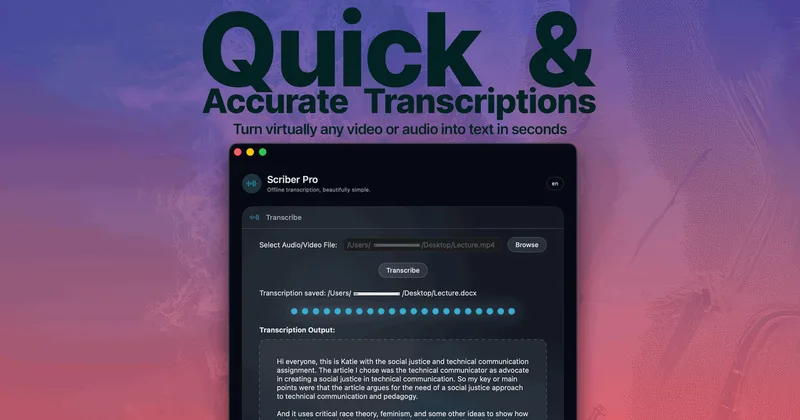
Scriber-Pro 2.0
Scriber Pro 2.0 is a macOS app for transcribing audio and video locally, including files, YouTube links, and M3U8/HLS web streams. It saves transcripts in a searchable library and exports them in several document formats.
TrueScribe
TrueScribe is a Windows and Linux desktop app for transcribing, editing, searching, translating, and researching audio and video recordings. Processing runs locally by default, with optional cloud models for selected features.

Recly
Recly is a free, open-source recorder and transcription app for Galaxy Watch, Apple Watch, iPhone, Mac, and Windows. It stores recordings and transcripts in your Google Drive, with on-device transcription or transcription through a provider you choose using your own API key.

Video2text
Video to Text is an AI-powered online transcription tool that converts video and audio into accurate, timestamped transcripts with speaker labels and support for 99 languages, intended for subtitles, meeting notes, interviews, courses, podcasts, and multilingual workflows.

TranscriptMate
TranscriptMate is an AI-powered transcription service that converts audio and video to text with an interactive editor, speaker diarization, multi-language support, and AI content generation to produce ready-to-publish materials.
Premium Alternatives



transcripci-n
Transcripción+ ofrece servicios de transcripción de audio a texto combinando transcripciones profesionales humanas y transcripción automática potenciada por IA, además de resúmenes, identificación de hablantes, traducción y una API para integraciones.

MeetNote
Meetnote is an AI meeting assistant that captures browser audio without joining calls as a bot, then generates speaker-labeled transcripts, summaries, action items, and searchable meeting records. It works through a Chrome extension and web workspace for Google Meet, Microsoft Teams, Zoom, and other browser audio.