Videotoprompt

Videotoprompt

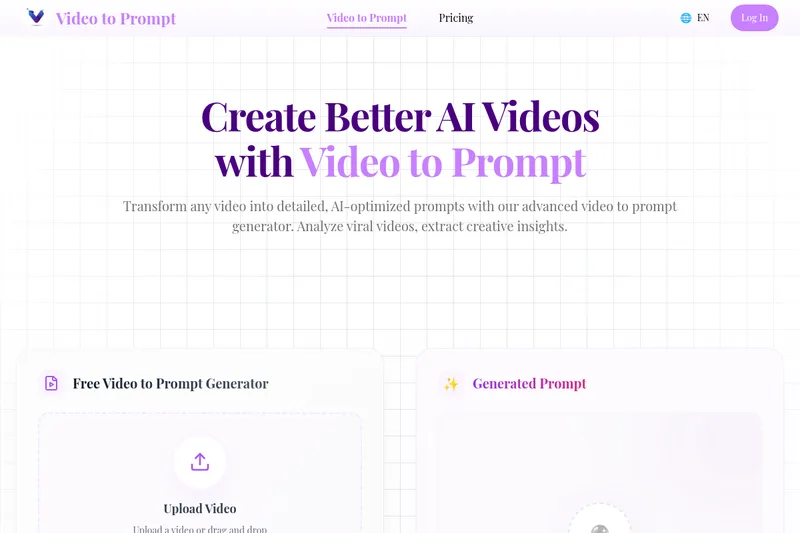
Video to Prompt converts any uploaded video into detailed, AI-optimized text prompts for recreating or remixing scenes with AI video generators. It targets creators, marketers, and developers who want fast, precise prompt extraction from existing footage.

Videotoprompt is video generation software teams evaluate for creative & design. Use this page to review pricing, integration signals, and the best alternatives before you commit.

Freemium Enterprise 70/100
#120 in Video Generation (120 tools)
Added 1 month ago
18557 directory views this week

Quick Overview

Best for: Creative & Design

What it does

Video Generation software for decision-makers comparing workflow fit and alternatives.

Best fit

Creative & Design

Pricing snapshot

Freemium from Free

Next step

Compare Videotoprompt with similar tools before you shortlist it.

Compare this tool before you shortlist it

Review alternatives, pricing posture, and workflow fit side by side.

Videotoprompt

Video to Prompt is a suite of AI-powered tools that analyze videos and generate comprehensive, generation-ready text prompts optimized for AI video platforms. The platform extracts visual elements, camera movements, lighting, composition, textures, and mood to produce prompts you can paste into AI video generators or refine for professional results. It is designed for creators, social media authors, marketers, and anyone who wants to study viral content or recreate scenes with AI.

The product includes specialized tools—Video to Prompt Generator, Image to Video Prompt, AI Describe Video, Video Prompt Generator, and an AI Video Generator—plus multi-platform export formats for services like Runway, Sora, Pika Labs, and Stable Video Diffusion.

Video to Prompt converts any uploaded video into detailed, AI-optimized text prompts for recreating or remixing scenes with AI video generators. It targets creators, marketers, and developers who want fast, precise prompt extraction from existing footage.

Own this listing?

Claim this page to add pricing, features, screenshots, and verified owner details.

Claim this listing

Key Features

Video to Prompt Generator

Analyzes uploaded video files and produces detailed, AI-optimized text prompts that describe visual elements, camera angles, lighting, movement, and atmosphere.

Image to Video Prompt

Converts a single static image into a dynamic video prompt suitable for AI video generation, describing motion, framing, and transitions.

AI Describe Video

Provides comprehensive video analysis identifying objects, actions, scenes, technical aspects, and composition to help understand and document footage.

Video Prompt Generator (from scratch)

Create custom video prompts from user ideas with controls for style, camera techniques, and technical specifications.

AI Video Generator

Generate videos directly from prompts using integrated AI models, with customizable styles and export-ready formats.

Multi-Platform Export

Optimizes generated prompts for major AI video platforms (Runway, Sora, Pika Labs, Stable Video Diffusion) and exports prompts in platform-specific formats.

Quick onboarding and guidance

Simple 3-step workflow: upload/select video, click Generate Prompt, then copy or refine the output. Optional guidance can be provided during upload.

Supported file types and size limits

Accepts MP4, MOV, AVI files up to 100MB for upload and analysis.

Pricing

Free Tier Available

5 free video-to-prompt analyses per day

Free

Free
  • 5 free video-to-prompt analyses daily
  • Access to core Video to Prompt Generator features
  • Support for MP4/MOV/AVI up to 100MB

Premium

Not publicly listed on the provided content
  • Unlimited video-to-prompt access (per content description)
  • Priority processing and additional features (details not listed)

Use Cases

Recreate viral videos with AI

Analyze viral TikToks, Reels, or YouTube clips to extract exact visual and technical details for faithful AI-generated remakes or remixes.

Pre-production and shot planning

Use generated prompts to communicate lighting, framing, and camera movement to production teams or to prototype scenes in AI tools.

Marketing and social content creation

Rapidly convert existing footage into new variations or short-form content optimized for platforms like Instagram and TikTok.

Learning and analysis

Study composition, color grading, and cinematography of successful videos to inform creative decisions and training materials.

Direct AI video generation

Paste generated prompts into supported AI video platforms (Runway, Sora, Pika Labs, Stable Video Diffusion) to produce new video assets.

Integrations

Runway (Runway ML)

Generate prompts formatted for Runway ML and paste them for AI video creation on the platform.

Sora / OpenAI Sora

Optimizes prompt outputs for use with Sora-compatible models and workflows.

Pika Labs

Provides prompts tailored for Pika Labs’ AI video generation requirements.

Stable Video Diffusion

Formats prompts for Stable Video Diffusion-style pipelines to assist in text-to-video generation.

Benefits

Speeds up prompt creation by automatically extracting cinematography and stylistic details from real videos.
Democratizes advanced video creation by making technical details accessible to non-technical creators.
Optimizes prompts for multiple AI platforms to reduce manual formatting and increase compatibility.
Helps preserve privacy by processing videos instantly and deleting them immediately after analysis.
Supports common video formats and provides a simple 3-step workflow for quick adoption.

Limitations

Maximum upload size is 100MB which may require trimming longer/high-resolution videos.
Supported file types are limited to MP4, MOV, and AVI; other formats are not listed as supported.
Analysis quality depends on source video clarity and composition; low-quality or highly compressed videos may yield less accurate prompts.
Exact pricing and detailed premium plan features are not publicly listed in the provided content.

Frequently Asked Questions

What is Video to Prompt?
Video to Prompt is an AI tool that analyzes video content and generates text prompts describing visual elements, camera movements, lighting, and mood to recreate or inspire new AI-generated videos.
How does video to prompt analysis work?
The AI analyzes visual elements, camera movements, composition, lighting, and stylistic cues in the uploaded video to extract structured descriptions that can be used as generation-ready prompts.
What makes the generated prompts detailed?
Prompts include technical and creative details such as camera angles, shot types (close-ups, tracking shots), lighting setup, color grading, textures, mood, and movement patterns to enable accurate recreation.
Is video to prompt generation free?
Yes. The platform provides 5 free video-to-prompt analyses daily. Premium plans (described as offering unlimited access) are available but pricing details are not listed in the provided content.
Is video to prompt processing secure?
According to the site, videos are processed instantly for analysis and deleted immediately afterward; the platform states that no video storage is retained during analysis to protect user privacy.
How do I use the generated prompts with AI video generators?
Copy the generated prompt and paste it into AI video generation platforms like Runway, Sora, Pika Labs, or Stable Video Diffusion. Prompts are optimized for multiple platforms.
What video files work best?
The tool supports MP4, MOV, and AVI files up to 100MB. Clear, higher-quality videos yield more accurate and detailed prompts.
Which platforms are supported?
The service lists Runway ML, OpenAI Sora, Pika Labs, and Stable Video Diffusion as supported platforms for using generated prompts.
How accurate is the analysis?
The site claims the AI is highly accurate at identifying visual elements and styles and that results improve via machine learning; users are advised to review and refine outputs as needed.
Why should I use Video to Prompt?
It makes video creation and learning more accessible by turning existing footage into actionable prompts, speeding up production workflows and inspiring new creative directions.

Getting Started

  1. 1 Step 1: Upload or drag-and-drop a video (MP4, MOV, AVI) up to 100MB.
  2. 2 Step 2: (Optional) Enter guidance or any specific instructions, then click the "Generate Prompt" button.
  3. 3 Step 3: Wait for the AI analysis, copy the generated prompt, and paste it into your preferred AI video generator or refine it further.

Support

email

[email protected] for direct support and inquiries.

docs

On-site FAQ and tool pages provide usage instructions and examples (access via the Video to Prompt website).

partners

Partner information and additional resources linked from the website (Partners page).

API

Available: No

Compare Videotoprompt with similar tools

See how it stacks up against alternatives

Freemium
Easyvid

Easyvid

EasyVid is an all-in-one AI video and animation studio that converts scripts or prompts into fully animated, voice‑over videos with consistent characters, auto-synced subtitles, music, and export-ready formats for social platforms.

Video Generation
High-growth
Freemium
Referencetovideo

Referencetovideo

Reference to Video is an AI video generator that uses a reference image or source video plus prompts to create new videos with improved subject consistency, scene transfer, and flexible generation workflows for creators, marketers, and teams.

Video Generation
Freemium
Video Ocean

Video Ocean

Video Ocean is an open-source AI-powered platform that enables users to generate high-quality, hyperrealistic videos effortlessly, democratizing video creation for all levels of creators.

Video Generation AI
Freemium
Deepbrain

Deepbrain

AI STUDIOS by DeepBrain AI is an all-in-one AI video creation platform that generates realistic avatar videos, text-to-video, dubbing and translation in 150+ languages, plus image and generative video tools powered by models like Sora 2, Veo 3.1 and Nano Banana Pro.

Video Generation
Free
Vibevideoing

Vibevideoing

Vibe Videoing is an AI-powered video generation platform that uses intelligent video agents to convert natural-language ideas into professional videos, handling scripting, storyboarding, visual synthesis and final rendering.

Video Generation
Freemium
Vidnoz

Vidnoz

Vidnoz is an AI-powered video creation platform focused on talking-photo avatars and automated video generation, offering 1900+ realistic avatars, 2800+ templates and multi-language AI voices for fast, browser-based content creation.

Video Generation
Freemium
Forgefluencer

Forgefluencer

ForgeFluencer is an all-in-one platform for creating, controlling, and generating consistent AI influencer images and videos — including model generation, outfit swapping, automated photoshoots, and video face swaps — aimed at creators, brands, and marketers.

Video Generation
Freemium
Vidofy

Vidofy

Vidofy is an all-in-one AI creative studio that generates videos, images, and audio from text, images, or video inputs using a wide library of cutting-edge AI models. It is designed for creators, marketers, developers, and businesses to quickly produce high-quality visual and audio content with minimal technical skill.

Video Generation

Premium Alternatives

Paid
Aidiary

Aidiary

AI Diary (Aidiary) appears to be an AI-powered diary product that sells consumable "AI Magic Credits" and subscription plans for access, with purchases processed via Lemon Squeezy.

Productivity
Paid
question-base

question-base

Question Base is an AI-powered answer agent integrated with Slack that automatically responds to repetitive internal questions by searching verified documentation and knowledge bases, helping teams save time and improve knowledge management.

Chatbots & Assistants
Paid
Idreem

Idreem

Dreem (branded on site as Dreem / Idreem) is an expert-led, AI-powered immigration platform that helps high-skilled tech professionals, founders, and businesses prepare and submit U.S. and UK talent visa petitions (O-1A, EB-1A, EB-2 NIW, L-1, E-2, UK Global Talent) through a combination of automated tools and licensed attorneys.

Legal
Paid
Videofaceswap

Videofaceswap

Face Swap AI (VideoFaceSwap.ai) is a web-based tool that creates high-quality, AI-powered face swap videos anonymously. Users can upload local videos or paste YouTube/TikTok/X links to generate deepfake-style swaps, GIFs, and professional headshots for social and commercial use.

Video
High-growth
Paid
tryvium-ai

tryvium-ai

tryvium is a Microsoft Teams–based cloud contact center platform that leverages AI to enhance customer support operations, offering intelligent self-service, agent assistance, and real-time analytics to improve customer and employee experiences.

Chatbots & Assistants
Paid
Deep-nudes

Deep-nudes

Deep Nude AI Generator is a web-based adult-oriented suite of AI tools for creating explicit deepfake content: one-click 'undress' image generation, face swap and deep fake videos, interactive NSFW games, and paid voice/sex-call experiences via Telegram.

Other
High-growth
Paid
Sellinger AI

Sellinger AI

Sellinger AI is an autonomous AI-powered LinkedIn outreach tool that crafts human-quality conversations at scale, nurturing leads to booked calls, enabling users to focus on closing deals.

Sales & Marketing AI Sales Tools
Paid
AI For Graphic Designers

AI For Graphic Designers

AI for Graphic Designers is an ebook and 8-hour video course designed to teach graphic designers how to leverage AI tools for creating art, logos, videos, and more, while also learning how to monetize AI-generated designs.

Education Design Tools

Explore Related Categories

Explore by Outcome