
autochat
AutoChat is an India-first WhatsApp automation platform that combines WhatsApp Business API, AI-assisted chatbots, team inbox/CRM, broadcasts, and commerce features to help SMEs, D2C brands, education teams, real estate teams, agencies, and service businesses manage leads, sales, and support on WhatsApp while preserving existing chat continuity.
autochat is chatbots & assistants software teams evaluate for content & marketing. Use this page to review pricing, integration signals, and the best alternatives before you commit.
Profile facts come from the vendor source. AiMatch labels unknown pricing or API details instead of estimating them.
Review official source →Used in These Packs
Quick Overview
Best for: Content & Marketing
What it does
Chatbots & Assistants software for decision-makers comparing workflow fit and alternatives.
Best fit
Content & Marketing
Pricing snapshot
Freemium from Contact AutoChat for INR plan details and setup pricing
Next step
Compare autochat with similar tools before you shortlist it.
Compare this tool before you shortlist it
Review alternatives, pricing posture, and workflow fit side by side.
AutoChat is an India-focused WhatsApp automation platform that helps businesses move from scattered personal-phone WhatsApp usage to a structured system for capturing leads, qualifying enquiries, routing conversations, and handing off to humans when needed. The platform is built around 'coexistence-first' automation — adding bots and templates while preserving existing chats, contacts, and WhatsApp call continuity.
AutoChat targets Indian SMEs, D2C brands, education and coaching teams, real estate and services, agencies, and local teams that rely heavily on WhatsApp for enquiries. It integrates inbox, templates/broadcasts, commerce (catalog and payment links), AI-assisted replies, CRM context, and workflow automation to keep the full WhatsApp customer journey visible and actionable.
WhatsApp automation platform with no-code chatbots and eCommerce integration.
Own this listing?
Claim this page for a one-time $29 to add pricing, features, screenshots, verified owner details, and a clearly labeled 30-day category position after the profile is live.
Claim this listing for $29Key Features
WhatsApp Business API & Onboarding
Support for WhatsApp Business API onboarding, template approval, and number setup with guidance on WABA/BSP requirements and boundaries.
AI-assisted Replies
AI can answer common questions, qualify leads, and assist agents while preserving human control and handoff.
Team Inbox & CRM
Shared team inbox with chat assignment, tags, notes, ownership, and customer history to replace scattered phone follow-up.
Broadcasts & Approved Templates
Create approved message campaigns, use templates for reminders/pricing/appointments, segment contacts, and route replies back to the right team.
WhatsApp Commerce
Support for catalogs, payment links, order follow-up, COD/payment-link handoff, and commerce-related conversation paths.
Coexistence-first Automation
Add automation around existing WhatsApp conversations without forcing all customers into an immediate full automation model.
No-code Visual Flow Builder
Build chatbot flows and conversation paths with visual modules rather than custom development.
API & Workflow Automation
Connect CRM, ecommerce, sheets, payment systems, lead ads, booking, and custom operations via APIs and webhooks.
Multilingual Support
Support for English as the primary layer with optional Hindi and Malayalam flows (and Arabic for UAE) to match customer language comfort.
Reporting & Review
Track response gaps, campaign replies, team workload, and lead quality across the WhatsApp workflow.
Pricing
Free trial available; AutoChat platform and setup fees are separate from Meta WhatsApp Business Platform messaging fees.
Contact Sales / Custom Plans
Contact AutoChat for INR plan details and setup pricing- Platform access and setup support
- Guidance on WhatsApp Business API and template setup
Use Cases
Sales & Lead Capture
Bring ad leads, website forms, QR/retail enquiries and Meta lead ads into WhatsApp; qualify leads, assign to sales, and follow up with templates and reminders.
Customer Support
Operate an inbox for FAQs and escalations, assign ownership to agents, and use automation for repeat questions while keeping human handoff available.
Ecommerce & D2C
Guide product discovery, recover carts, hand off to payment links, and follow up on orders within WhatsApp conversations.
Education & Coaching
Capture enquiries, qualify course interest, answer FAQs, and route admissions follow-up to the right team member.
Real Estate & Services
Qualify property or service leads, book follow-ups, send approved updates, and assign owners for consistent follow-up.
Agencies & BSP Teams
Manage client leads, campaign replies, onboarding, number setup, and shared inbox workflows across multiple clients.
Integrations
CRM & Sheets
Send leads, events and customer context into CRMs and sheets for team workflows.
Ecommerce Platforms
Connect product catalogs, orders and payment links for commerce handoff inside WhatsApp.
Payment Systems
Support payment link creation and handoff to customers during conversations.
Meta Lead Ads / Website Forms
Capture leads from Meta lead ads and website forms into WhatsApp workflows.
Webhooks / Custom APIs
Connect booking systems, custom operations and automation via webhooks and APIs.
Benefits
Limitations
Frequently Asked Questions
Why does AutoChat matter for Indian businesses?
Are Meta WhatsApp fees included in AutoChat pricing?
Should every India page be translated into Hindi and Malayalam?
Getting Started
- 1 Step 1: Book a product demo or start a free trial via the website ('Book product demo' / 'Start free trial').
- 2 Step 2: Confirm business use case, team size, and WhatsApp API (WABA/BSP) requirements during onboarding calls.
- 3 Step 3: Configure team inbox, approved templates/broadcasts, chatbot flows, routing rules, and coexistence settings.
- 4 Step 4: Integrate required systems (CRM, ecommerce, sheets, payment links, lead ads) and test payment/catalog handoffs.
- 5 Step 5: Launch workflows, monitor response gaps and team workload, and iterate on templates and routing.
Support
Docs & Guides
Documentation and guides are listed in site resources (Documentation, Guides).
Demo / Sales
Book a product demo or automation strategy call from the website to plan onboarding and implementation.
Onboarding
WABA / BSP onboarding and implementation support is available via booked onboarding sessions.
App Stores
Mobile access via Google Play and the App Store for mobile management.
API
Compare autochat with similar tools
See how it stacks up against alternatives
Related Tools
View all 175 →


ChatSKU
ChatSKU turns product catalogs into an AI-powered B2B buying assistant that answers product questions, builds quotes, and captures orders. It is designed for manufacturers, distributors, and wholesalers, and can be added to an existing website with an embedded script.
chatchit-ai
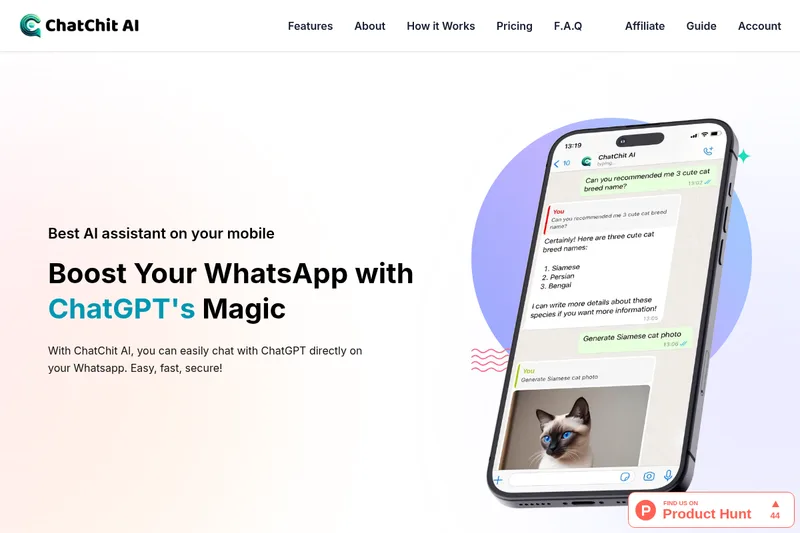
ChatChit AI connects an AI assistant to WhatsApp, where users can ask questions, chat in more than 100 supported languages, and generate images. It offers monthly and yearly plans, with a free start option advertised.

raggenie
RAGgenie is a low-code platform for building retrieval-augmented generation (RAG) conversational AI 'copilots' from your existing data, enabling teams and individuals to create, run locally, and integrate custom GenAI assistants without advanced technical skills.


Relish AI
Relish AI is a ChatGPT-powered chatbot for e-commerce stores that automates customer support and sales conversations, including product discovery, recommendations, and abandoned-cart recovery. The page describes Shopify-focused use and integrations with Shopify Inbox, Klaviyo, and Gorgias.
Premium Alternatives



trainmy-ai
TrainMyAI builds custom, on-premise or cloud-hosted AI chatbots using retrieval-augmented generation (RAG) for private content, with access via WhatsApp, the web, and a private API while keeping all data on your own server.

MARA
MARA is AI-powered hotel reputation management software that helps hotel teams draft review replies in their brand voice, analyze guest feedback, and manage reputation workflows across properties. It combines a shared review inbox, analytics, surveys, widgets, and integrations.



ChatPersona AI
ChatPersona AI is an AI-powered OnlyFans chat tool delivered through a Chrome extension. It generates responses using selectable personas and is marketed to creators seeking to manage subscriber conversations, tips, and PPV sales.

swms-ai
SWMS AI uses industry-specific safety information to generate customized risk assessments and safety documents, and provides Oscar, an AI assistant for workplace safety questions. It is designed for teams in industries including construction, mining, oil and gas, logistics, and facilities management.