
ChatGPT for Excel
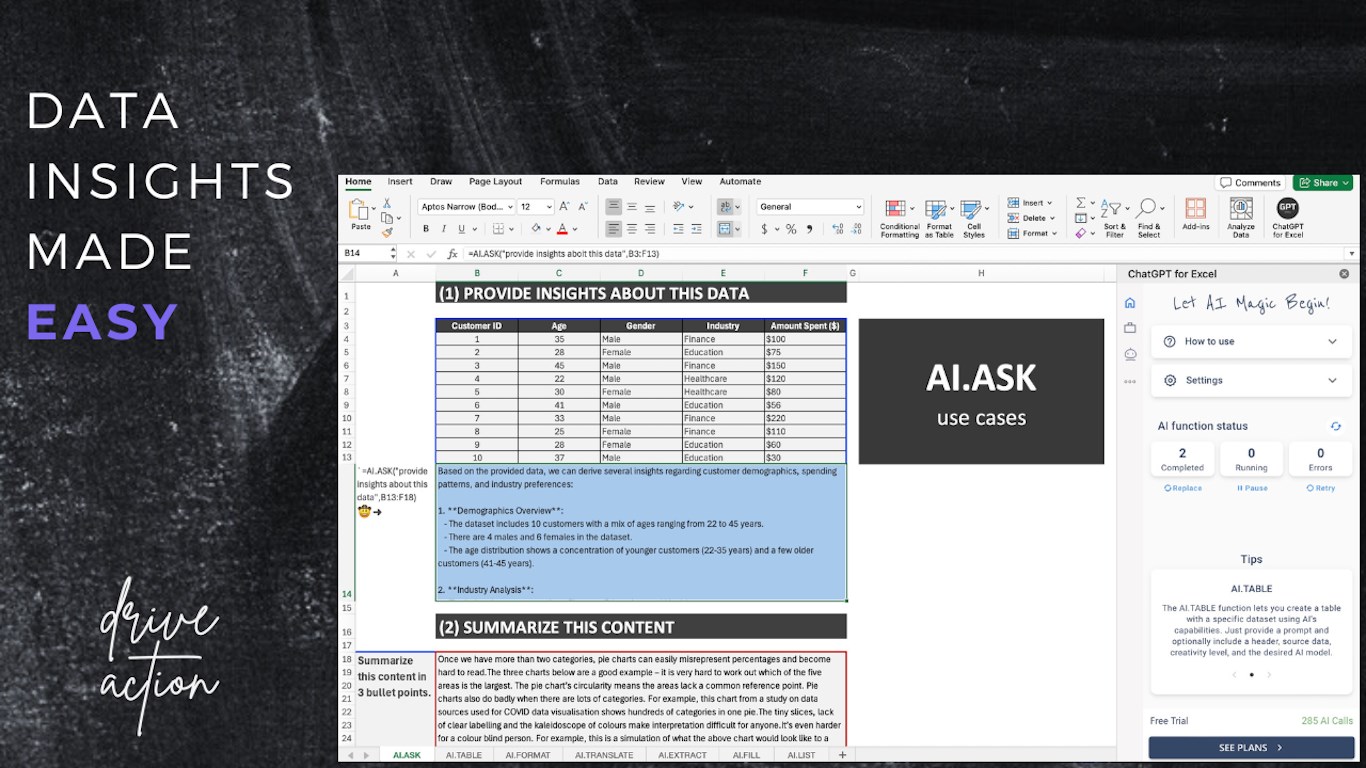
ChatGPT for Excel is an AI-powered add-in for Microsoft Excel that automates tasks, provides data insights, and enhances productivity by integrating advanced AI models directly into spreadsheets.
ChatGPT for Excel helps spreadsheet users bring AI assistance into Excel workflows. Use this page to review pricing posture, use cases, and alternatives.
Used in These Packs
Quick Overview
Best for: Spreadsheet users comparing AI assistants for Excel workflows
What it does
Excel software for decision-makers comparing workflow fit and alternatives.
Best fit
Spreadsheet users comparing AI assistants for Excel workflows
Pricing snapshot
Freemium from Hassle-free plan where the provider covers OpenAI costs and usage fees.
Next step
Compare ChatGPT for Excel with similar tools before you shortlist it.
Compare this tool before you shortlist it
Review alternatives, pricing posture, and workflow fit side by side.
ChatGPT for Excel
ChatGPT for Excel is designed to boost productivity for Microsoft Excel users by leveraging AI technology to automate routine tasks, generate insights, and simplify workflows. It features a free AI assistant that answers Excel-related questions and supports multiple AI models including GPT-4o and Claude models with a large context window for processing extensive data. This add-in is ideal for professionals and businesses looking to enhance their data management and decision-making processes within Excel.
ChatGPT for Excel by Apps Do Wonders LLC is an AI-powered Excel add-in offering tools like AI.ASK, AI.TRANSLATE, AI.EXTRACT, AI.FILL, and AI.TABLE to automate tasks, format data, translate content, and generate insights. Supports GPT-4, Claude 3.5, and other models with large context windows (up to 200K tokens). Plans include STARTER (AI cost included), PRO (your own OpenAI key), and TEAM (centralized billing). Includes a free AI Assistant for Excel help. Boosts productivity for individuals and teams.
Own this listing?
Claim this page to add pricing, features, screenshots, and verified owner details.
Claim this listingKey Features
AI.ASK
Allows users to ask questions and receive AI-generated answers and engaging content directly within Excel.
AI.TABLE
Enables creation of AI-powered tables quickly and efficiently.
AI.TRANSLATE
Translates spreadsheet content into dozens of languages using AI.
AI.FORMAT
Automatically formats data for consistency and improved readability.
AI.EXTRACT
Extracts valuable insights from data to support analysis.
AI.FILL
Cleans data and fills in missing ranges to ensure completeness.
AI.LIST
Generates list outputs in separate rows for better organization.
AI.CHOICE
Selects the most closely matching value from a list of choices.
Support for Claude Models
Includes Claude AI models (Haiku, Sonnet, Opus) with a 200K context window for handling large datasets.
Pricing
Free trial available before choosing a paid plan.
STARTER
Hassle-free plan where the provider covers OpenAI costs and usage fees.- Access to AI features
- No direct OpenAI billing
PRO
Fixed subscription fee for add-in usage; AI usage payments made directly to OpenAI via user account.- Full AI model access
- User-managed OpenAI billing
TEAM
Subscription with flexible user management and consolidated billing under one master account, suitable for businesses.- Multi-user support
- Centralized billing
- Business-oriented features
Use Cases
Automating Data Tasks
Automate repetitive Excel tasks such as data cleaning, formatting, and filling missing values to save time.
Data Analysis and Insights
Extract meaningful insights from complex datasets using AI-powered extraction and analysis features.
Multilingual Data Translation
Translate spreadsheet content into multiple languages to support global teams and clients.
Content Generation
Generate engaging content and answers to Excel-related questions directly within the spreadsheet.
Business Team Collaboration
Use the TEAM plan to manage multiple users with consolidated billing, ideal for business environments.
Integrations
Microsoft Excel
Seamlessly integrates as an add-in within Microsoft Excel to enhance spreadsheet capabilities.
OpenAI Models
Supports GPT-4o mini, GPT-4o (omni), GPT-3.5 Turbo, GPT-4, GPT-4 Turbo models for AI processing.
Claude AI Models
Integrates Claude 3.5 Sonnet, Claude 3 Opus, and Claude 3 Haiku models for extended context and data handling.
Benefits
Limitations
Frequently Asked Questions
What AI models does ChatGPT for Excel support?
Is there a free trial available?
Can I use ChatGPT for Excel in a business environment?
Does the add-in send data over the internet?
How do I get support for ChatGPT for Excel?
Getting Started
- 1 Install the ChatGPT for Excel add-in from Microsoft AppSource.
- 2 Sign in to your Microsoft account to activate the add-in.
- 3 Choose a subscription plan after the free trial to access AI features.
- 4 Start using AI-powered functions like AI.ASK, AI.TABLE, and AI.TRANSLATE within your Excel spreadsheets.
Support
Support page
Access support and detailed information via the Microsoft AppSource details and support tab.
Documentation
Documentation and usage instructions are available on the product page.
API
No public API documentation available for ChatGPT for Excel add-in.
Not specified in the available information.
Compare ChatGPT for Excel with similar tools
See how it stacks up against alternatives
Related Tools
View all 182 →
Autoslide AI PowerPoint Add In
Autoslide AI PowerPoint Add-In is a productivity tool designed to help professionals create and format PowerPoint presentations faster using AI-driven slide formatting, content generation, and a rich resource library.
Ourdia
Ourdia is an email automation tool that organizes your inbox, sorts messages, and drafts ready-to-send responses, saving you up to 5 hours per week. It integrates easily with Gmail, Outlook, and other email services, adapting to your communication style while keeping you in control.




Big Weather
Big Weather is a user-friendly weather app for macOS that provides detailed weather information directly from the Mac menubar, offering both free and premium tiers to suit different user needs.


Premium Alternatives

Photostudio
Blockode AI Photo Studio generates custom AI photoshoots by training a studio-specific model from your uploaded selfies, letting you create consistent, high-resolution images via prompts and image-to-image generation.

Pixelmost
Pixelmost is an AI-powered app prototyping tool for iPhone, iPad, and Mac that generates mobile app mockups, interactive prototype flows, and app icons from a simple prompt in seconds. It's aimed at founders, designers, and product teams who need rapid visual concepts, pitch screens, and review-ready prototypes.

showmemoney
ShowMeMoney is an AI-powered expense tracking app that helps users track payments across cards, accounts, and cash with smart automation and insightful visualizations for smarter spending and saving.



Stablediffusionai
Stable Diffusion AI Generator Online (StableDiffusionAI) is a web-based text-to-image platform powered by Stable Diffusion and SDXL that lets users create high-resolution AI art from text prompts with tools for inpainting, outpainting, embeddings and model customizations.

Myfuturechildren
My Future Children is a web app that generates an AI-predicted image of a child by combining two parent photos. Users upload two parent images, choose a gender, and receive a generated child image in about 30 seconds.