Chatpdf
ChatPDF is an AI-powered web app that lets you chat with PDFs and other documents to summarize, analyze, translate, and extract information with built-in citations. It targets researchers, students, and professionals and offers free and paid plans.
Chatpdf is research software teams evaluate for education & research. Use this page to review pricing, integration signals, and the best alternatives before you commit.
Profile facts come from the vendor source. AiMatch labels unknown pricing or API details instead of estimating them.
Review official source →Quick Overview
Best for: Education & Research
What it does
Research software for decision-makers comparing workflow fit and alternatives.
Best fit
Education & Research
Pricing snapshot
Freemium from Free
Next step
Compare Chatpdf with similar tools before you shortlist it.
Compare this tool before you shortlist it
Review alternatives, pricing posture, and workflow fit side by side.
ChatPDF is an AI-powered web application that allows users to upload PDFs and other document formats and interact with them conversationally: summarize, ask questions, translate, and extract key insights. The product is pitched to researchers, students, and professionals who need faster understanding of documents such as academic papers, reports, contracts, and manuals. Responses include built-in citations that link back to the PDF so users can verify sources.
The platform supports multi-file conversations via folders, side-by-side view of chat and document, multilingual inputs and outputs, and sharing controls. ChatPDF offers a free tier (analyzes 2 documents per day) and a ChatPDF Plus subscription for power users with unlimited document analysis and advanced features. The site also lists desktop and mobile apps and provides API documentation for developer access.
ChatPDF is an AI-powered web app that lets you chat with PDFs and other documents to summarize, analyze, translate, and extract information with built-in citations. It targets researchers, students, and professionals and offers free and paid plans.
Own this listing?
Claim this page for a one-time $29 to add pricing, features, screenshots, verified owner details, and a clearly labeled 30-day category position after the profile is live.
Claim this listing for $29Key Features
Chat with PDF
Upload a PDF and ask questions or have a conversation about the document's content in natural language.
Summarize PDFs
Automatically summarize academic articles, research papers, reports, and other documents to extract key insights without reading everything.
Built-in citations
Responses include citations anchored to the original PDF references so users can verify and navigate to source passages.
Multi-File Chats & Folders
Create folders and bring multiple PDFs into a single conversation to compare content and ask cross-document questions.
Side-by-Side View
Keep the chat and the PDF open together; clickable citations scroll to the exact source in the document.
Multilingual Support & Translation
Accepts PDFs in any language and can chat in any language or translate document content on demand.
Multiple File Type Support
Supports a growing range of formats including PDF, Word (.doc/.docx), PowerPoint (.ppt/.pptx), Markdown (.md), and Text (.txt).
No-signup Trial & Saved History
Core features are available without an account; creating a free account unlocks saved history and multi-document chats.
Secure Sharing
Generate secure links for specific PDFs to invite others; manage access rights and revoke sharing permissions.
Security & Compliance
Documents are protected by SSL during transfer and stored with a SOC2 Type II certified storage provider; users can delete documents at any time.
Pricing
Free plan that allows analyzing 2 documents every day and can be tried without creating an account.
Free
Free- Analyze up to 2 documents per day
- No signup required for core features
ChatPDF Plus
Paid (price not listed on page)- Unlimited document analysis
- Advanced features for power users
Use Cases
Academic Research
Explore and summarize scientific papers, extract methods and results, and get citations for literature reviews and research workflows.
Studying & Homework
Students can use ChatPDF to study for exams, get homework help, and answer multiple choice questions faster by querying study materials.
Professional Document Analysis
Professionals can navigate legal contracts, financial reports, manuals, and training materials by asking targeted questions about PDFs.
Multilingual Document Understanding
Translate and interrogate documents in any language, enabling international research and cross-language workflows.
Cross-document Analysis
Use folders and multi-file chats to compare, correlate, and synthesize information across multiple documents in one conversation.
Integrations
API
API Docs are provided (link on site) for programmatic access and developer integrations.
Desktop & Mobile Apps
Desktop and mobile apps are available to access ChatPDF across devices.
YouTube & Web Content
The platform advertises the ability to chat with files, videos, or websites (including YouTube) alongside PDFs.
Benefits
Limitations
Frequently Asked Questions
What is ChatPDF and how can it help me?
Is ChatPDF free?
How does ChatPDF's AI technology work?
Does ChatPDF support file types other than PDFs?
Do I need to create an account to use ChatPDF?
Getting Started
- 1 Step 1: Open ChatPDF in your browser and drop a PDF (or upload/CTRL+V text or links) to start.
- 2 Step 2: Ask questions in natural language to summarize, extract information, or request citations from the document.
- 3 Step 3: Optionally create a free account to save chat history and organize files into folders; upgrade to ChatPDF Plus for unlimited document analysis and advanced features.
Support
Docs
API Docs and product information are available via the 'API Docs' link on the site.
Contact
A 'Contact' link is listed in the footer for reaching the ChatPDF team.
Legal & Policies
Privacy Policy and Terms & Conditions links are available in the footer for legal and policy questions.
API
API Docs linked from the site footer (see 'API Docs').
Compare Chatpdf with similar tools
See how it stacks up against alternatives
Related Tools
View all 143 →
ThoughtDAG
ThoughtDAG is an open-source, desktop-first application that makes LLM context visible, editable, and reproducible by representing context as an editable directed acyclic graph (wires = context) and letting users preview and control exactly what the model receives.

LLM Attention Visualization
A browser-based interactive visualization that shows how transformer LLMs allocate attention to past tokens during generation by aggregating attention weights and value magnitudes across heads and layers.

PilotCite
PilotCite is a SaaS platform that helps brands monitor and improve their visibility in AI-generated answers (ChatGPT, Perplexity, Google AI, Gemini, Claude, Copilot, Grok) by tracking citations, auditing site citability, benchmarking competitors, and generating source-backed content.
HieraticBench
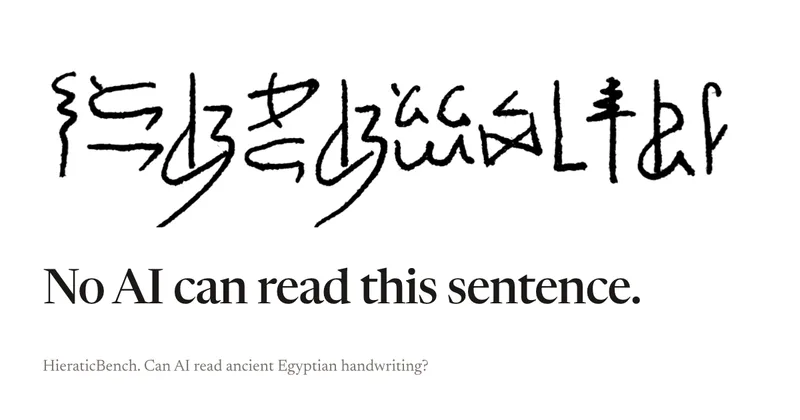
HieraticBench is an open benchmark for testing whether AI models can identify and read hieratic, the cursive handwriting of ancient Egypt. It includes a public leaderboard, evaluation harness, and dataset of documents and individual signs.
Redactle LLM Leaderboard
A public benchmark dashboard that evaluates how well large language models (LLMs) solve Redactle puzzles by running standardized evaluations and publishing ranked results, costs, and performance metrics.

Knowledge graph skill for Claude/Kimi Code
SysEdge is an ontological knowledge graph and CLI for multi-agent Claude Code and Kimi Code teams that models requirements, tests, and architecture standards to surface specification, test, and standards gaps before code ships and to reduce agent orientation tokens.
Premium Alternatives

CiteRank
CiteRank is a weekly SaaS monitoring tool that re-asks buyer questions of major AI answer engines (ChatGPT, Perplexity, Google AI Overviews, Gemini and Claude) to record whether they cite your site, name your brand, or leave you absent, and delivers board-style reports and competitor/source lists.
grantboost
Grantboost is an AI grant discovery and proposal-writing platform for nonprofits, agencies, universities, and other mission-driven organizations. It matches funding opportunities to an organization’s programs and helps draft proposals using its past content and brand voice.


SermonAI
SermonAI is a web-based sermon preparation platform for pastors, combining AI-assisted research and writing with planning, sermon organization, preaching tools, and content repurposing. Its AI research can be tailored to a pastor’s denomination, Bible translation, and trusted voices.

AI ChatDocs
AI ChatDocs is a GPT-4 powered document chat and summarization tool that lets users upload PDFs, Word/PPT/Docx/TXT files, websites, sitemaps and YouTube videos to generate summaries, extract references, and interactively chat with document content.