
gistreader
GistReader is a web-based read-it-later app that uses AI to summarize articles and remove distractions, supporting individual pages and RSS feeds while syncing content across devices.
gistreader is productivity software teams evaluate for creative & design. Use this page to review pricing, integration signals, and the best alternatives before you commit.
Profile facts come from the vendor source. AiMatch labels unknown pricing or API details instead of estimating them.
Review official source →Used in These Packs
Quick Overview
Best for: Creative & Design
What it does
Productivity software for decision-makers comparing workflow fit and alternatives.
Best fit
Creative & Design
Pricing snapshot
Paid from $5/month
Next step
Compare gistreader with similar tools before you shortlist it.
Compare this tool before you shortlist it
Review alternatives, pricing posture, and workflow fit side by side.
GistReader is a web reader and read-it-later application that automatically transforms articles into a clean, readable format and generates AI summaries to help users extract key insights quickly. It supports both single web pages and RSS feeds, strips pages of non-relevant content such as ads, and offers features intended to reduce distraction and save time. The product synchronizes content and preferences across devices (phone, tablet, laptop, desktop) and includes extra features such as Pocket integration, keyboard shortcuts, YouTube support, OPML import, dark mode, and AI-generated podcasts.
AI-powered web reader for summarizing articles and removing distractions.
Own this listing?
Claim this page for a one-time $29 to add pricing, features, screenshots, verified owner details, and a clearly labeled 30-day category position after the profile is live.
Claim this listing for $29Key Features
AI article summaries
Every article is automatically summarized using AI to provide a quick essence of the content.
Read without distraction
Transforms any article into a clean and readable format by stripping non-relevant content like ads; supports individual pages and RSS feeds.
Cross-device sync
Works on phone, tablet, laptop, and desktop with content and preferences automatically synced across devices.
Pocket integration
Integrates with Pocket to save and manage content.
AI podcasts
Generates AI podcasts from content (monthly podcast allotments vary by plan).
YouTube support
Includes support for YouTube content.
OPML import
Supports OPML import for feed migration and management.
Keyboard shortcuts & dark mode
Provides keyboard shortcuts and a dark mode for improved reading and navigation.
No ads
Service is provided without advertisements.
Pricing
A free option is available with limited features; a free 14-day trial is offered and 'Start for free' requires no payment information.
Bronze
$5/month- 100 feeds
- 100 summaries per month
- 5 AI podcasts per month
- Pocket integration
Silver
$8/month- Unlimited feeds
- 300 summaries per month
- 10 AI podcasts per month
- Pocket integration
Gold
$15/month- Unlimited feeds
- Unlimited summaries
- 30 AI podcasts per month
- Pocket integration
Use Cases
Quick article triage
Use AI summaries to determine whether to read the full article or save time by consuming the summary.
Feed aggregation and reading
Subscribe to and follow RSS feeds or individual pages, with content cleaned and summarized for efficient consumption.
Turning written content into audio
Generate AI podcasts from saved articles to listen on the go (monthly podcast generation limits apply by plan).
Synchronized reading across devices
Keep reading progress, saved items, and preferences consistent across phone, tablet, and desktop devices.
Integrations
Save and manage content via Pocket integration (listed as included in all plans).
RSS / OPML
Supports RSS feeds and OPML import for subscribing and migrating feeds.
YouTube
Includes support for YouTube content.
Benefits
Limitations
Frequently Asked Questions
Is GistReader an RSS reader?
What is RSS?
Can you add support for feature X?
What languages do you support?
Do you offer refunds?
Who built GistReader?
Getting Started
- 1 Step 1: Visit the web app at https://app.gistreader.com and create an account (Start for free link).
- 2 Step 2: Add individual pages or subscribe to RSS feeds (OPML import is supported) to populate your reading list.
- 3 Step 3: Read summaries, generate AI podcasts, and configure preferences (syncs across devices). Consider upgrading to a paid plan if you need higher limits.
Support
No verified support channels are available.
API
Compare gistreader with similar tools
See how it stacks up against alternatives
Related Tools
View all 132 →
Windrunner
Windrunner is an AI-powered project collaboration and work management platform that combines work items, decisions, blockers, evidence, and progress into a single shared workspace to help teams coordinate work and review AI-proposed updates.

threadfork
threadfork is a macOS native, on-device AI notetaker that records, transcribes, and organizes meetings locally on Apple Silicon — generating summaries, threads (commitments/decisions), entities, and semantic search without sending audio to the cloud.


Afterlid, guarded lid closed work for macOS
Afterlid is a native macOS menu‑bar app that keeps downloads, renders, backups, dev servers, remote access, and local AI agents running after you close the lid by offering guarded modes (Sleepy, Awake, Always On) with built‑in battery, thermal, heartbeat, and time limits.

CardGo
CardGo is a Chrome extension and context-management product that stores small, reusable, end-to-end encrypted AI context “cards” you attach to chats (ChatGPT, Claude, Gemini, Perplexity, Grok) so multiple AI tools can access the right user context without sharing your full profile.
Habit Pocket
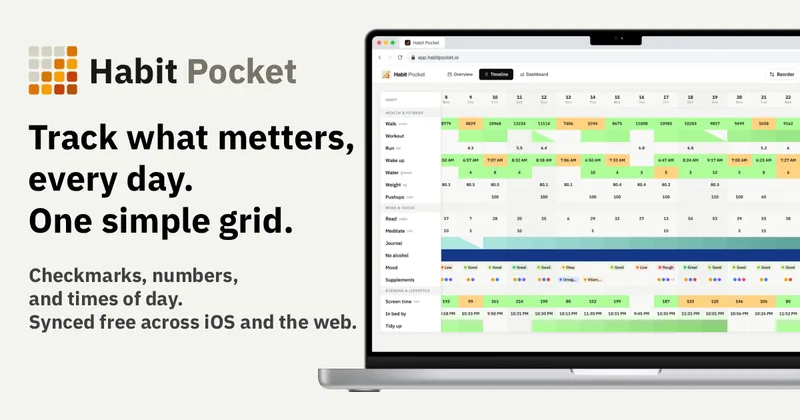
Habit Pocket is a multi-platform habit tracker that logs yes/no checks, numeric values, times, and categorical selections in a single grid, plus charts and AI integrations to reveal correlations between habits, sleep, mood, and energy.
Budget-Friendly Alternatives
threadfork
threadfork is a macOS native, on-device AI notetaker that records, transcribes, and organizes meetings locally on Apple Silicon — generating summaries, threads (commitments/decisions), entities, and semantic search without sending audio to the cloud.
Afterlid, guarded lid closed work for macOS
Afterlid is a native macOS menu‑bar app that keeps downloads, renders, backups, dev servers, remote access, and local AI agents running after you close the lid by offering guarded modes (Sleepy, Awake, Always On) with built‑in battery, thermal, heartbeat, and time limits.
CardGo
CardGo is a Chrome extension and context-management product that stores small, reusable, end-to-end encrypted AI context “cards” you attach to chats (ChatGPT, Claude, Gemini, Perplexity, Grok) so multiple AI tools can access the right user context without sharing your full profile.
Habit Pocket
Habit Pocket is a multi-platform habit tracker that logs yes/no checks, numeric values, times, and categorical selections in a single grid, plus charts and AI integrations to reveal correlations between habits, sleep, mood, and energy.

TriageBox
TriageBox AI Gmail Checker is a Chrome extension and native Android app that turns a Gmail inbox into a prioritized triage queue — archive, snooze, unsubscribe, sweep senders with exact counts, and optionally generate AI summaries using keys you supply. Data processing runs in the user’s browser; no developer-operated backend.