
Jottoo
Jottoo is a meeting workspace that records meetings, transcribes audio, generates AI-driven summaries, and turns follow-ups into actionable tasks with offline-friendly sync and end-to-end encryption.
Jottoo is ai tools software teams evaluate for productivity. Use this page to review pricing, integration signals, and the best alternatives before you commit.
Profile facts come from the vendor source. AiMatch labels unknown pricing or API details instead of estimating them.
Review official source →Used in These Packs
Quick Overview
Best for: Productivity
What it does
AI Tools software for decision-makers comparing workflow fit and alternatives.
Best fit
Productivity
Pricing snapshot
Paid from $13.99 USD / month (excludes tax)
Next step
Compare Jottoo with similar tools before you shortlist it.
Compare this tool before you shortlist it
Review alternatives, pricing posture, and workflow fit side by side.
Jottoo is a meeting-focused workspace that captures conversations, produces searchable transcripts, generates concise summaries and key decisions, and converts follow-ups into actionable tasks. It’s designed for users who want to focus on conversations while Jottoo handles note-taking and task creation. The product emphasizes privacy and reliability with offline-friendly notes, encrypted sync for sensitive content, and a subscription-funded (no-ads) model.
AI meeting notes that turn into tracked tasks Discussion | Link
Own this listing?
Claim this page for a one-time $29 to add pricing, features, screenshots, verified owner details, and a clearly labeled 30-day category position after the profile is live.
Claim this listing for $29Key Features
Meeting recording and transcription
Record meetings, upload audio, or write notes and receive a searchable transcript so you can stay engaged in the conversation.
AI-powered summaries
Instant summaries that surface important decisions, highlights and a concise overview without rereading entire transcripts.
Actionable tasks
Convert follow-ups into tasks and manage them alongside notes and your other work with a built-in task list.
Smart folders and notes
Organise notes and meetings using folders and a workspace designed for quick capture, recent meetings and task lists.
Calendar workflow
Workflow features that connect meeting notes and tasks to calendar-driven follow-ups (described as 'calendar workflow').
Offline-friendly access
Notes are offline-friendly—open and edit when offline and sync changes when back online.
Encrypted sync & end-to-end encryption
Encrypted sync for sensitive note content and stated end-to-end encryption to minimise unnecessary data sharing.
Mobile apps (beta)
Native iOS and Android apps are available in beta with limited spots; beta users receive an invite and one free month when their spot opens.
Pricing
7-day free trial with full access — no credit card required.
Monthly subscription
$13.99 USD / month (excludes tax)- Meeting recording and transcription
- Summaries, notes and folders
- Actionable tasks and calendar workflow
- Offline-friendly notes and end-to-end encryption
Use Cases
Capture and review meetings
Record meetings or upload audio to get searchable transcripts and AI summaries for easier review and knowledge capture.
Turn discussions into action
Automatically extract key decisions and create follow-up tasks to ensure action items are tracked and assigned.
Work offline and sync securely
Create and edit notes while offline and have encrypted sync reconcile changes when connectivity returns.
Quick demos and evaluation
Explore an interactive browser demo (temporary demo content) or start a 7-day free trial without a credit card to evaluate the workspace.
Integrations
No verified integration details are available.
Benefits
Limitations
Frequently Asked Questions
What is Jottoo?
How much does Jottoo cost?
Is there a free trial?
How does Jottoo handle my data?
Can Jottoo work offline?
What platforms are supported?
Can I cancel anytime?
Getting Started
- 1 Start a 7-day free trial from the site (no credit card required).
- 2 Explore the interactive demo in the browser to see Jottoo's workspace and features (demo content is temporary).
- 3 Sign up for an account at workspace.jottoo.com and begin recording or uploading meetings.
- 4 Optionally join the mobile beta waitlist to receive an invite and one month free when a beta spot opens.
Support
docs/FAQ
Product FAQ and help content available on the Jottoo website.
feedback
Feedback and support links are provided on the site (Feedback/Support pages in the footer).
demo
Interactive browser demo available to explore features without creating an account.
API
Compare Jottoo with similar tools
See how it stacks up against alternatives
Related Tools
View all 132 →
Windrunner
Windrunner is an AI-powered project collaboration and work management platform that combines work items, decisions, blockers, evidence, and progress into a single shared workspace to help teams coordinate work and review AI-proposed updates.

threadfork
threadfork is a macOS native, on-device AI notetaker that records, transcribes, and organizes meetings locally on Apple Silicon — generating summaries, threads (commitments/decisions), entities, and semantic search without sending audio to the cloud.


Afterlid, guarded lid closed work for macOS
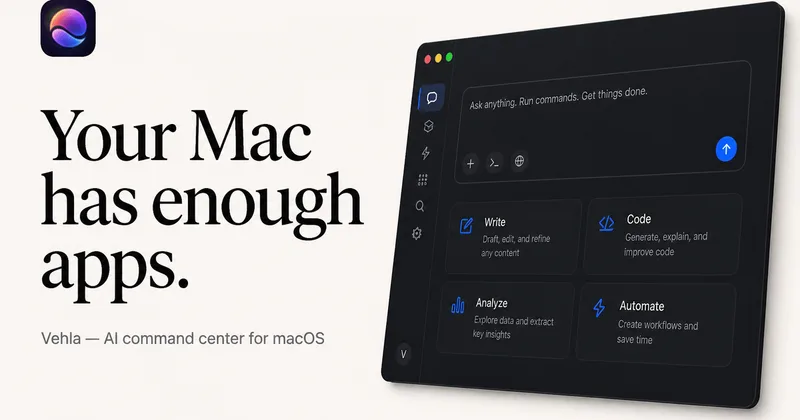
Afterlid is a native macOS menu‑bar app that keeps downloads, renders, backups, dev servers, remote access, and local AI agents running after you close the lid by offering guarded modes (Sleepy, Awake, Always On) with built‑in battery, thermal, heartbeat, and time limits.

CardGo
CardGo is a Chrome extension and context-management product that stores small, reusable, end-to-end encrypted AI context “cards” you attach to chats (ChatGPT, Claude, Gemini, Perplexity, Grok) so multiple AI tools can access the right user context without sharing your full profile.
Habit Pocket
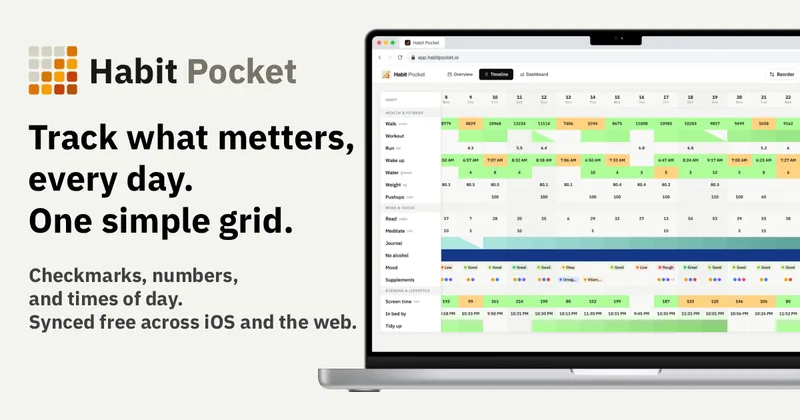
Habit Pocket is a multi-platform habit tracker that logs yes/no checks, numeric values, times, and categorical selections in a single grid, plus charts and AI integrations to reveal correlations between habits, sleep, mood, and energy.
Budget-Friendly Alternatives
threadfork
threadfork is a macOS native, on-device AI notetaker that records, transcribes, and organizes meetings locally on Apple Silicon — generating summaries, threads (commitments/decisions), entities, and semantic search without sending audio to the cloud.
Afterlid, guarded lid closed work for macOS
Afterlid is a native macOS menu‑bar app that keeps downloads, renders, backups, dev servers, remote access, and local AI agents running after you close the lid by offering guarded modes (Sleepy, Awake, Always On) with built‑in battery, thermal, heartbeat, and time limits.
CardGo
CardGo is a Chrome extension and context-management product that stores small, reusable, end-to-end encrypted AI context “cards” you attach to chats (ChatGPT, Claude, Gemini, Perplexity, Grok) so multiple AI tools can access the right user context without sharing your full profile.
Habit Pocket
Habit Pocket is a multi-platform habit tracker that logs yes/no checks, numeric values, times, and categorical selections in a single grid, plus charts and AI integrations to reveal correlations between habits, sleep, mood, and energy.


TriageBox
TriageBox AI Gmail Checker is a Chrome extension and native Android app that turns a Gmail inbox into a prioritized triage queue — archive, snooze, unsubscribe, sweep senders with exact counts, and optionally generate AI summaries using keys you supply. Data processing runs in the user’s browser; no developer-operated backend.