
remio - AI Note Taker
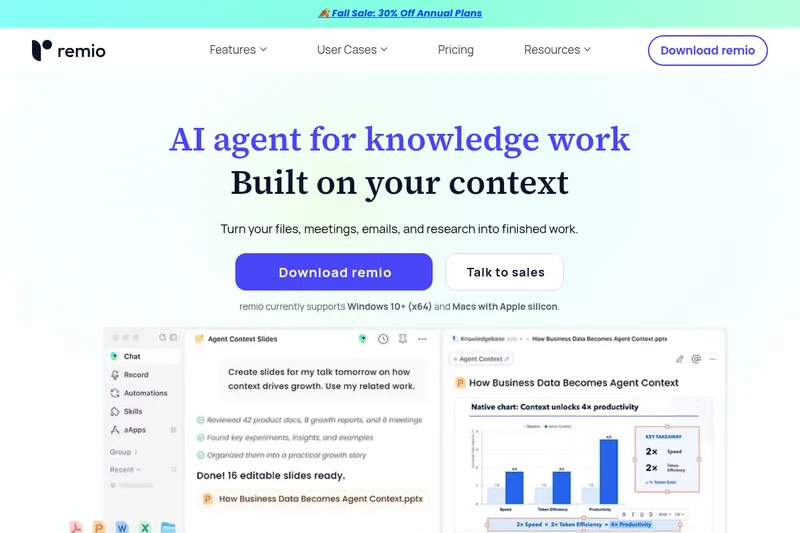
remio gathers files, meetings, email, and research into a searchable AI workspace, then uses that context to help knowledge workers produce answers and work deliverables. It runs on Windows 10+ (x64) and Macs with Apple silicon.
One of 125 tools in Productivity
Who it's for
- Product managers and managers who want to collect work context and use it for planning.
- Researchers and consultants who need to search and synthesize information from documents, web content, videos, and meetings.
- Engineers and other teams using AI agents who want to retrieve organized work context through the CLI.
Not the right fit if…
- People using a desktop without Windows 10+ (x64) or Apple silicon Macs: those are the desktop platforms currently listed.
- People looking for a mobile-only app: the remio mobile app requires the desktop app to work.
How it fits your workflow
Set up data sources such as files and connected work tools. remio indexes and organizes context from those sources, and the site says it can also capture web information and meeting content.
Ask remio questions across the collected material, search multiple meetings, and review the original sources cited in answers.
Use the gathered context to create results such as editable PowerPoint presentations, or retrieve relevant context through the CLI for general-purpose agents.
Pricing
Free: The site repeatedly advertises "Try remio for free" and download links for a free offering.
Free
Free / Get started for free (download available)
- · Access to core capture and Ask remio features (as indicated by 'Try remio for free' and download links)
Subscription
Paid subscription (promoted Mid-year Sale: 30% off)
- · Paid plan details not specified on the supplied page
Prices checked on Jul 15, 2026 from the vendor's site. They can change; confirm before you buy.
Key features
- Automatic capture & sync
- Remio runs in the background and auto-saves web pages, local files, emails, recordings, images and notes into a single searchable knowledge base.
- Ask remio / AI Search
- Conversational search across your entire knowledge base with precise source citations ("Ask remio").
- AI Summary
- Generate concise summaries for long articles or videos both inside the app and via the browser extension.
- Local recording & transcription
- Unlimited local recording and transcription; described as fast and private by design.
- Smart Organization
- AI-suggested Collections that help systematically organize captured information and discover connections.
- Content summarizers & clippers
- YouTube Summarizer, PDF Summarizer, Slides Summarizer, Website Summarizer and a Web Clipper to save and summarize content.
Works with
- Browser extension
- Mobile apps
- Local files & email
Limitations to know
- The desktop app currently supports Windows 10+ (x64) and Macs with Apple silicon.
- The mobile app requires the desktop app to work.
- The page mentions a 30% discount on annual plans but does not provide plan prices or detailed plan limits.
Alternatives to consider
-
Mindly
Choose it if you want a macOS-first second-brain app focused on capturing and connecting notes, links, files, and voice recordings with on-device AI.
-
HyNote AI
Choose it if your main need is transcribing and summarizing a wider range of audio, video, document, image, and web inputs.
-
TwinMind
Choose it if you want a note-taking and memory assistant centered on capturing conversations and drafting follow-up emails from past interaction context.
Getting started
Windows 10+ (x64) or a Mac with Apple silicon. The mobile app requires the desktop app.
- Download the desktop app for a supported platform.
- Set up the data sources you want remio to use.
- Connect CLI, MCP, or other services if needed.
- Ask remio to find context or create a result.
Frequently asked questions
What is remio, and who is it for?
remio is an AI-powered personal knowledge hub designed to help users efficiently collect, organize, and utilize information. It transforms messy info into clear insights and is aimed at knowledge workers such as managers, professionals, engineers, researchers, and students.
What are the core differences between remio and note-taking apps?
Remio is positioned as an AI Second Brain and Assistant that automatically captures web content and syncs local files into a private knowledge base. It provides conversational search (Ask remio) and AI-suggested organization rather than requiring manual note management.
How does remio help me build a 'Second Brain'?
Remio automatically captures web pages and local files, uses AI-suggested Collections to organize information, and provides conversational tools (Ask remio) to quickly find and use stored knowledge — enabling offloading of memory and more focus on thinking and creativity.
What are remio's core AI features?
Core AI features listed include AI Search (Ask remio), AI Summary (summaries for articles and videos), Smart Organization (AI-suggested Collections), and upcoming features such as Knowledge Blending and Smart Write.