

AI Summarizer (summarizer.org)
AI Summarizer (summarizer.org) is a web-based AI-powered text summarization tool that shortens text while preserving main points, supporting text, DOCX, images and URLs, multiple output styles (paragraphs, bullet points), multiple languages, and optional premium features.
AI Summarizer (summarizer.org) is productivity software teams evaluate for education & research. Use this page to review pricing, integration signals, and the best alternatives before you commit.
Profile facts come from the vendor source. AiMatch labels unknown pricing or API details instead of estimating them.
Review official source →Used in These Packs
Quick Overview
Best for: Education & Research
What it does
Productivity software for decision-makers comparing workflow fit and alternatives.
Best fit
Education & Research
Pricing snapshot
Paid from $7 billed monthly
Next step
Compare AI Summarizer (summarizer.org) with similar tools before you shortlist it.
Compare this tool before you shortlist it
Review alternatives, pricing posture, and workflow fit side by side.
AI Summarizer (summarizer.org) is an online AI-driven summary generator that shortens text while preserving main points and original context. It accepts plain text, URLs, DOCX files and images, and can produce summaries as paragraphs, bullet lists or custom-length outputs. The tool is positioned for a wide audience including students, writers, researchers and professionals who need quick, concise summaries of essays, articles, reports and other large documents. The site offers a free usage tier (up to 1,200 words per task) and optional Premium plans, an Android app, and an API documented on the site.
AI-powered tool for summarizing texts, articles, and essays with key points.
Own this listing?
Claim this page for a one-time $29 to add pricing, features, screenshots, verified owner details, and a clearly labeled 30-day category position after the profile is live.
Claim this listing for $29Key Features
Multi-format input
Accepts plain text, pasted URLs, TXT, DOCX and image files for summarization.
Multiple output styles
Generates summaries as paragraphs, bullet points, or custom formats according to user selection.
Adjustable summary length
Slider to set preferred output length (examples: Short, 50%, Medium, Long) and a custom option.
Advanced AI
Uses advanced machine learning and NLP models and is described as trained on the latest AI models to select and score key sentences for summarization.
Language support
Supports multiple major languages including Spanish, Portuguese, French, German and others without pre-translation.
Download and copy output
Download generated summaries in .docx format or copy to clipboard.
Data privacy claim
Claims '100% data safe and never shared with anyone.'
Article URL summarization
Add URL feature to summarize published articles directly from their links.
Mobile app and API
Android app available on Play Store and API documentation is listed on the site.
Pricing
Free to use up to 1,200 words per task without signing up.
Monthly Plan
$7 billed monthly- Access to premium features (history access and other premium-only capabilities implied by UI)
Yearly Plan
$5.6 (33% off) billed yearly — $67 billed yearly- Lower per-month equivalent price when billed annually
Use Cases
Academic summarization
Summarize essays, research papers and reports to create concise abstracts or study notes.
Article and blog summarization
Generate quick overviews of online articles or blog posts using the Add URL feature.
Professional reports
Condense long business reports or large documents into executive summaries or bullet-point key takeaways.
Content repurposing and editing
Produce shorter versions of content for social media, briefs, or to prepare drafts for rewriting and paraphrasing tools on the site.
Language-agnostic summarization
Create summaries for content in multiple languages without manual translation.
Integrations
API
API documentation is available on the site (API plan and documentation referenced in site footer).
Android app (Play Store)
Android app available for download from the Play Store to use summarization tools on mobile.
Add URL
Built-in capability to summarize published web articles via URL input.
Benefits
Limitations
Frequently Asked Questions
What Is a Summary?
Will the AI Summarize Tool Disrupt the Context of Writing?
Does It Support Other Languages?
Can I use a Summarizer to Shorten my College Essay?
Is the Summarizer Tool Free to Use?
How Can I Adjust the Generated Summary Length?
Can I Summarize Published Articles?
Getting Started
- 1 Step 1: Paste your text in the input box or upload a TXT, DOCX, or IMAGE file (or use Add URL to summarize a webpage).
- 2 Step 2: Use the slider to choose the preferred summary length or select Paragraph/Bullet/Custom output.
- 3 Step 3: Click the 'Summarize' button, then download the .docx file or copy the summarized text to the clipboard.
Support
Contact via [email protected] (listed on the site).
docs
API Documentation and site Help/Blogs linked in footer ('API Documentation', 'Blogs', 'Contact').
app store
Android app listing on Play Store for mobile support and distribution.
API
API Documentation is referenced in the site footer (link labeled 'API Documentation').
Compare AI Summarizer (summarizer.org) with similar tools
See how it stacks up against alternatives
Related Tools
View all 132 →
Windrunner
Windrunner is an AI-powered project collaboration and work management platform that combines work items, decisions, blockers, evidence, and progress into a single shared workspace to help teams coordinate work and review AI-proposed updates.


threadfork
threadfork is a macOS native, on-device AI notetaker that records, transcribes, and organizes meetings locally on Apple Silicon — generating summaries, threads (commitments/decisions), entities, and semantic search without sending audio to the cloud.

Afterlid, guarded lid closed work for macOS
Afterlid is a native macOS menu‑bar app that keeps downloads, renders, backups, dev servers, remote access, and local AI agents running after you close the lid by offering guarded modes (Sleepy, Awake, Always On) with built‑in battery, thermal, heartbeat, and time limits.

CardGo
CardGo is a Chrome extension and context-management product that stores small, reusable, end-to-end encrypted AI context “cards” you attach to chats (ChatGPT, Claude, Gemini, Perplexity, Grok) so multiple AI tools can access the right user context without sharing your full profile.
Habit Pocket
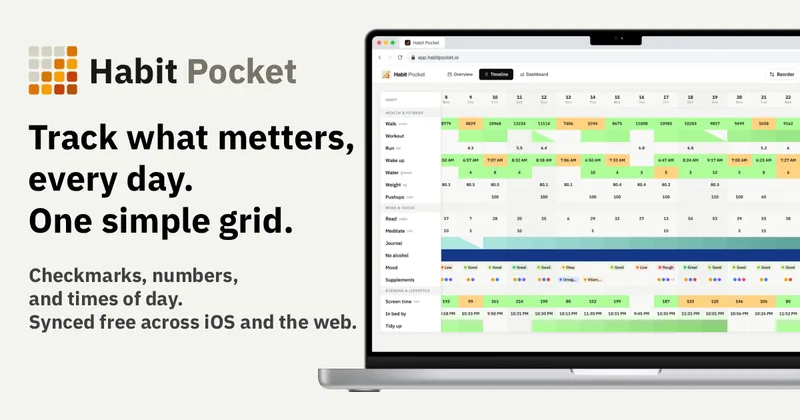
Habit Pocket is a multi-platform habit tracker that logs yes/no checks, numeric values, times, and categorical selections in a single grid, plus charts and AI integrations to reveal correlations between habits, sleep, mood, and energy.
Budget-Friendly Alternatives
threadfork
threadfork is a macOS native, on-device AI notetaker that records, transcribes, and organizes meetings locally on Apple Silicon — generating summaries, threads (commitments/decisions), entities, and semantic search without sending audio to the cloud.
Afterlid, guarded lid closed work for macOS
Afterlid is a native macOS menu‑bar app that keeps downloads, renders, backups, dev servers, remote access, and local AI agents running after you close the lid by offering guarded modes (Sleepy, Awake, Always On) with built‑in battery, thermal, heartbeat, and time limits.
CardGo
CardGo is a Chrome extension and context-management product that stores small, reusable, end-to-end encrypted AI context “cards” you attach to chats (ChatGPT, Claude, Gemini, Perplexity, Grok) so multiple AI tools can access the right user context without sharing your full profile.
Habit Pocket
Habit Pocket is a multi-platform habit tracker that logs yes/no checks, numeric values, times, and categorical selections in a single grid, plus charts and AI integrations to reveal correlations between habits, sleep, mood, and energy.


TriageBox
TriageBox AI Gmail Checker is a Chrome extension and native Android app that turns a Gmail inbox into a prioritized triage queue — archive, snooze, unsubscribe, sweep senders with exact counts, and optionally generate AI summaries using keys you supply. Data processing runs in the user’s browser; no developer-operated backend.