BatchEdits
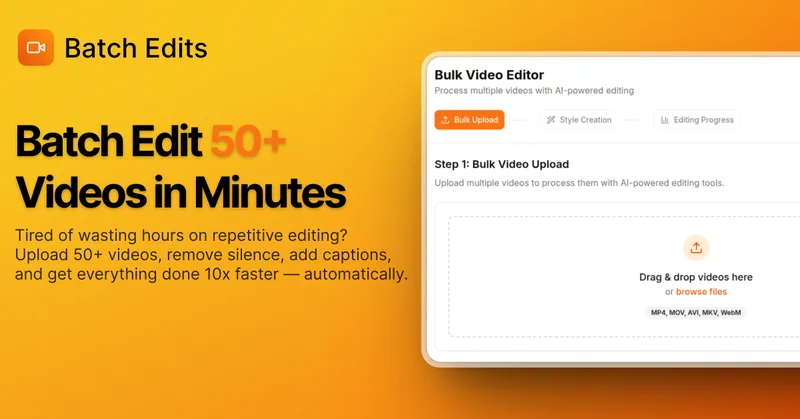
BatchEdits is a web-based batch AI video editor for content creators that processes up to 50 videos simultaneously to remove silence, add auto-captions in 50+ languages, apply auto-zoom and crop for platform-specific formats, enabling high-volume creators to scale editing work.
BatchEdits is video editing software teams evaluate for video editing. Use this page to review pricing, integration signals, and the best alternatives before you commit.
Profile facts come from the vendor source. AiMatch labels unknown pricing or API details instead of estimating them.
Review official source →Used in These Packs
Quick Overview
Best for: Video Editing
What it does
Video Editing software for decision-makers comparing workflow fit and alternatives.
Best fit
Video Editing
Pricing snapshot
Freemium from $15
Next step
Compare BatchEdits with similar tools before you shortlist it.
Compare this tool before you shortlist it
Review alternatives, pricing posture, and workflow fit side by side.
BatchEdits is a web-based batch video editor designed for creators who need to process many clips quickly. The product processes up to 50 videos simultaneously and automates common editing tasks — removing silence, adding AI-generated captions in 50+ languages, applying auto-zoom, and cropping for platform-specific aspect ratios (TikTok, Instagram Reels, YouTube, Instagram feed). It targets high-volume creators, podcasters, YouTubers, and agencies who want to convert raw footage into ready-to-post clips in minutes rather than hours.
BatchEdits also exposes an MCP (Model Context Protocol) server so AI agents (Claude, Cursor, Windsurf, ChatGPT) can control uploads, trigger silence removal and caption generation, and fetch finished files from a single prompt in the agent workspace. The product is entirely web-based, offers a 3-video free trial (no credit card), interactive demos, and lifetime pricing plans.
Stop editing videos one by one. Use our batch AI video editor to remove silence, auto-generate captions, and export your daily content in minutes.
Own this listing?
Claim this page for a one-time $29 to add pricing, features, screenshots, verified owner details, and a clearly labeled 30-day category position after the profile is live.
Claim this listing for $29Key Features
Bulk Video Processing
Upload and process up to 50 videos simultaneously with parallel processing and a single configuration applied to the whole batch.
Smart Auto-Captions
AI transcription with synchronized captions in 50+ languages, burned into video with customizable viral styles and animated active-word highlights; claimed 95% accuracy on clear speech.
Silence Remover
Automated silence detection and removal with selectable aggressiveness (Basic: >3s, Moderate: >1.5s, Aggressive: >0.5s) to trim dead air and stutters in bulk.
Multi-Format Presets & Cropping
Export-optimized presets for TikTok (9:16), Instagram Reels (9:16), YouTube (16:9), and Instagram feed (1:1), with cropping, resizing and positioning in one click.
MCP Server / AI Agent Integration
BatchEdits provides an MCP server endpoint to allow AI agents (Claude, Cursor, Windsurf, ChatGPT) to upload footage, run silence removal and captioning, and export finished videos via prompts.
Image-to-Video Compilation
Compile a folder of images plus an audio file into a finished video with captions and silence removal applied automatically.
Web-based No-Install Editor
Operates entirely in the browser on Mac, Windows, iPhone, and Android — no download or installation required.
Pricing
3 free videos with no credit card required
Minimum
$15- 15 video exports total
- Auto captions & transcripts
- Smart silence remover
- 9:16 vertical cropping
Creator Starter
$49- 100 video exports total
- Auto captions & transcripts
- Smart silence remover
- 9:16 vertical cropping
Content Machine
$99- 300 video exports total
- Auto captions & transcripts
- Smart silence remover
- 9:16 vertical cropping
Agency
$249- 1,000 video exports total
- Auto captions & transcripts
- Smart silence remover
- 9:16 vertical cropping
Use Cases
High-volume social posting
Creators who post daily can batch-edit many short clips at once, crop for platform formats, and add captions to maintain consistent posting cadence.
Bulk captioning for multi-language reach
Automatically add synchronized captions in 50+ languages to expand reach across international audiences.
Podcast and long-form trimming
Remove dead air and stutters from long recordings in bulk to produce tighter highlight clips for social platforms.
Agency & client workflows
Agencies can process hundreds or thousands of exports using the Agency lifetime plan and parallel processing to scale client deliverables.
AI-driven automated editing
Integrate with AI agents (Claude, ChatGPT, Cursor, Windsurf) to trigger uploads, silence removal, captioning, and exports from an agent prompt.
Integrations
Claude (MCP)
Connect via the BatchEdits MCP server to upload footage, trigger silence removal/captions, and export files from a Claude workspace.
ChatGPT (MCP)
Use the MCP server to allow ChatGPT to control BatchEdits operations from inside a ChatGPT workspace.
Cursor & Windsurf (MCP)
MCP integration supports Cursor and Windsurf agents for programmatic editing workflows.
Benefits
Limitations
Frequently Asked Questions
How many videos can I process at once?
What video formats are supported?
How accurate is the AI transcription?
Is there a free trial?
Do I need to install any software?
Can I use BatchEdits with Claude or ChatGPT?
How much does BatchEdits cost?
Getting Started
- 1 Step 1: Upload your clips or drag a folder (supports MP4, MOV, AVI).
- 2 Step 2: Choose a preset (YouTube, TikTok, Podcast, or Custom), select caption and silence-removal settings, and pick export aspect ratios.
- 3 Step 3: Start editing and download all finalized, ready-to-post MP4 files in bulk. Optionally connect the MCP server to control BatchEdits from an AI agent.
Support
Docs
MCP setup documentation and site help are available from the BatchEdits website (see 'Read MCP setup documentation').
Demo
Interactive demo and a 3-minute demo video are available on the site.
Web / Dashboard
Sign in to the web dashboard to upload footage, start jobs, and download finished files.
API
MCP server endpoint documented on the site (https://batchedits.com/api/mcp) and 'Read MCP setup documentation' is referenced.
Compare BatchEdits with similar tools
See how it stacks up against alternatives
Related Tools
View all 23 →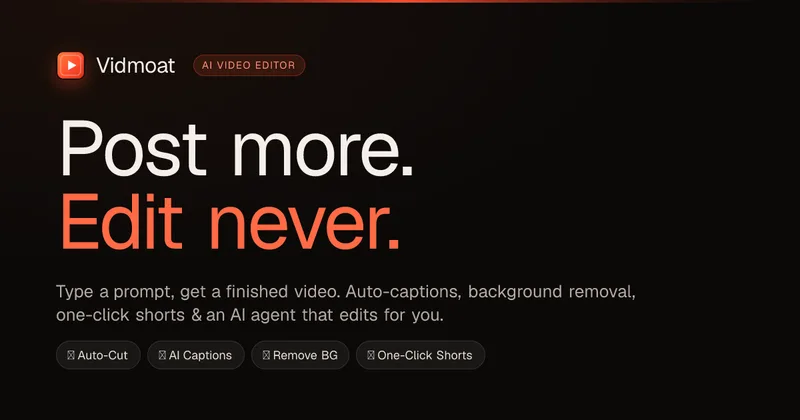
Vidmoat
Vidmoat is an agent-first AI video editor that automates cutting, captions, color grading and multi-format export. Users type a prompt (or connect their own agent) and Vidmoat’s built-in AI or a connected MCP agent produces finished videos ready for TikTok, Reels, Shorts and YouTube.


Writepanda
PandaStudio (by Writepanda) is a local-first, agent-native video editor for macOS and Windows that records screen/camera/podcasts and uses on-device transcription and user-provided AI accounts to automate editing, captions, and publishing. It is sold as a one-time license with lifetime updates.

reap: AI Video Editor
reap is an AI-first video editor that automates turning long videos, webinars, and interviews into clips, animated captions, dubbed audio, and translated subtitles across 100+ languages, with REST API, CLI, and MCP for automation and publishing.

autoagentx
AutoAgentX is an AI-powered video editor focused on improving short-form clips by creating stronger hooks, cleaner subtitles, and tighter pacing to increase retention for creators and teams.

Premium Alternatives

Tella
Tella is an all-in-one screen recorder and video editor that captures screen, camera, microphone and system audio on Mac, Windows or in the browser, and provides editing, AI-assisted cleanup, hosting, analytics, and team collaboration for sharing or exporting videos up to 4K.
Eddie AI
Eddie AI is an AI assistant video editor that turns raw footage into structured rough cuts from plain-language instructions. It also handles tasks such as footage logging, multicam editing, color grading, captions, and music, with exports to professional NLEs.