

AI Toolbox (formerly ChatGPT Toolbox)
AI Toolbox (formerly ChatGPT Toolbox) is a Chrome extension that adds folders, full-text search, bulk export, smart tags, prompt chaining and other productivity features for ChatGPT, Google Gemini, Anthropic Claude, and xAI Grok in a single install.
AI Toolbox (formerly ChatGPT Toolbox) is productivity software teams evaluate for productivity. Use this page to review pricing, integration signals, and the best alternatives before you commit.
Profile facts come from the vendor source. AiMatch labels unknown pricing or API details instead of estimating them.
Review official source →Used in These Packs
Quick Overview
Best for: Productivity
What it does
Productivity software for decision-makers comparing workflow fit and alternatives.
Best fit
Productivity
Pricing snapshot
Freemium from $0 forever
Next step
Compare AI Toolbox (formerly ChatGPT Toolbox) with similar tools before you shortlist it.
Compare this tool before you shortlist it
Review alternatives, pricing posture, and workflow fit side by side.
AI Toolbox is a browser extension (Chrome and other Chromium browsers) that layers organization, search, export, and prompt-management tooling on top of major chat-AI surfaces: ChatGPT, Google Gemini, Anthropic Claude, and xAI Grok. It provides local-first storage and indexing in the browser, folder and subfolder organization, full-text search across messages, bulk actions and exports, smart auto-tagging, a prompt library with chaining and templates, message bookmarks, media gallery and writing analytics. The product targets individual power users and teams; a free starter tier is available and paid Premium, Lifetime and Enterprise plans unlock unlimited folders, bulk export formats (TXT, Markdown, JSON, PDF), advanced automation and team administration features.
The extension emphasizes privacy and local-first handling of data (no external servers), cross-platform coverage (one install supports four AI platforms), and workflows for professional usage including enterprise seat management and centralized billing.
Browser extension enhancing ChatGPT with organization, search, and productivity features.
Own this listing?
Claim this page for a one-time $29 to add pricing, features, screenshots, verified owner details, and a clearly labeled 30-day category position after the profile is live.
Claim this listing for $29Key Features
Folders & Subfolders
Add folders and nested subfolders to ChatGPT, Gemini, Claude and Grok to organize conversations; free plan includes limited folders, Premium unlocks unlimited folders and pinned folders.
Full-text Search
Local-first full-text search across every synced conversation with filters (role, date, exact match); free plan limits search results per query, Premium removes limits.
Bulk Actions & Export
Select multiple conversations to bulk delete, archive, export or download as ZIP. Exports available as TXT (free), Markdown, JSON and PDF (Premium).
Prompt Library & Chaining
Save prompts, insert with // shortcut, and link prompts into multi-step chains using .. with runtime placeholders for automation; curated library of expert prompts included.
Smart Tags & Auto-tagging
Automatic tagging across categories (Coding, Writing, Research, Math & Science, Business) with custom tag rules and filters to keep chats organized without manual filing.
Context Mentions (@@)
Reference and pull any past chat into the composer as context using the @@ mention mechanism, with automatic summarization for long threads.
Message Bookmarks & Artifact Vault
Bookmark specific messages inside conversations, add notes/color labels (Premium), and save artifacts (Claude artifact vault) with one-click download and correct file extensions.
Media Gallery & Audio Download
Collect every AI image into a gallery searchable by prompt and download ChatGPT responses as MP3 with inline preview and multiple voices (some limits on free tier).
Command Palette & Floating Toolbox
Keyboard-driven launcher (Cmd+K/Ctrl+K), shortcuts (Cmd+Shift+F / Cmd+Shift+L) and a floating button for quick access to pinned features.
Context Window Meter
Live meter showing how full a platform's context window/token usage is for the active conversation.
Local-first Storage & Privacy
Background sync to local IndexedDB, GDPR compliance, and claims that data is stored locally in the browser and not sent to external servers.
Pricing
Free forever plan includes 2 folders, 2 bookmarks, 2 saved prompts, 5 search results per query, and limited daily exports; no credit card required.
Free
$0 forever- Works on ChatGPT, Gemini, Claude and Grok
- Up to 2 folders and 2 pinned chats
- Up to 2 saved prompts
- 5 search results per query
Premium Monthly (per platform)
$9.99/month per platform- Unlimited folders, prompts and search
- Bulk export (TXT, MD, JSON, PDF)
- Full prompt library and 100+ templates
- 24-hour support response
All Access Lifetime
$149 one-time- Unlocks every module (ChatGPT, Gemini, Claude, Grok) and future platforms
- All Premium features unlocked
- Top-priority support across modules
- No recurring charges or expiration
Per-platform Lifetime
"Per-platform Lifetime" available for $99 (see pricing page)- Lifetime unlock for a single platform (one-time)
Enterprise (teams)
Starting at $10/seat/month billed annually (starts at $50/month for 5 seats)- Admin dashboard, seat management, centralized billing, usage analytics
- 12-hour priority support, custom onboarding included
- Minimum 5 seats
Use Cases
Developers
Find past coding sessions by error message or function name, bookmark working code, export sessions as Markdown/JSON and chain prompts for debugging workflows.
Marketers
Organize research, save and reuse marketing prompts and templates, export conversations for documentation and reporting.
Teams & Enterprise
Manage a team’s AI workflows from a centralized dashboard with seat management, centralized billing, usage analytics and admin controls.
Researchers
Search hundreds of research chats, filter by date and role, export findings as PDF and maintain an artifact vault for reproducible outputs.
Writers & Content Creators
Use prompt templates, writing analytics, live character/word counters and media gallery to manage drafts and exported content.
Students & Consultants
Save and classify important turns with bookmarks/tags, reference previous chats in new prompts and back up conversations for future reference.
Integrations
ChatGPT (chat.openai.com)
Adds folders, full-text search, prompts, automation, bookmarks, exports and analytics directly into the ChatGPT sidebar.
Google Gemini (gemini.google.com)
Adds folders, full-text search with filters, smart tags, context mentions and watermark-free image downloads for Gemini conversations.
Anthropic Claude (claude.ai)
Adds folders, artifact vault, full-text search, message bookmarks and one-click export of Claude conversations.
xAI Grok (grok.com & x.com/i/grok)
Adds folders and inline folder tree, full-text search across both Grok surfaces, exports with per-message timestamps, bookmarks and bulk operations.
Chromium browsers (Chrome, Edge, Brave, Opera, Arc)
Extension runs on Chrome and compatible Chromium browsers; installable from the Chrome Web Store.
Benefits
Limitations
Frequently Asked Questions
What is AI Toolbox?
Is AI Toolbox the same as ChatGPT Toolbox?
Is AI Toolbox free?
Which AI platforms does AI Toolbox support?
How do I export my AI conversations?
Is AI Toolbox safe? Does it access my data?
Getting Started
- 1 Step 1: Install the AI Toolbox extension from the Chrome Web Store or compatible Chromium browser using the Add to Chrome/Add to Edge button on the site.
- 2 Step 2: Open ChatGPT, Gemini, Claude or Grok; the AI Toolbox sidebar panel and UI elements (folders, command palette, floating toolbox) will appear in the platform’s interface.
- 3 Step 3: Use search-to-add to move conversations into folders, save prompts with //, run chains with .., and upgrade to Premium or All Access Lifetime to unlock unlimited folders, bulk export formats and team features.
Support
Documentation
In-depth guides and resources on the site (guides for organizing, exporting, prompt management, enterprise workflows and backups).
Community
Public community channels: Reddit and Discord links are listed for users to join.
Sales & Enterprise
Contact Sales for Enterprise plans and custom onboarding (site includes a Learn More / Contact Sales flow).
Email / Paid Support
Paid plans advertise 24-hour support response for Premium and prioritized/12-hour priority support for Enterprise customers; contact via site support channels.
API
Compare AI Toolbox (formerly ChatGPT Toolbox) with similar tools
See how it stacks up against alternatives
Related Tools
View all 113 →
Windrunner
Windrunner is an AI-powered project collaboration and work management platform that combines work items, decisions, blockers, evidence, and progress into a single shared workspace to help teams coordinate work and review AI-proposed updates.


threadfork
threadfork is a macOS native, on-device AI notetaker that records, transcribes, and organizes meetings locally on Apple Silicon — generating summaries, threads (commitments/decisions), entities, and semantic search without sending audio to the cloud.

Afterlid, guarded lid closed work for macOS
Afterlid is a native macOS menu‑bar app that keeps downloads, renders, backups, dev servers, remote access, and local AI agents running after you close the lid by offering guarded modes (Sleepy, Awake, Always On) with built‑in battery, thermal, heartbeat, and time limits.
CardGo
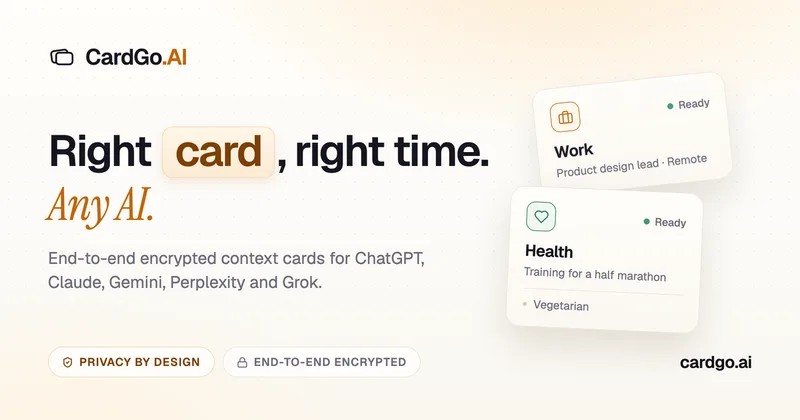
CardGo is a Chrome extension and context-management product that stores small, reusable, end-to-end encrypted AI context “cards” you attach to chats (ChatGPT, Claude, Gemini, Perplexity, Grok) so multiple AI tools can access the right user context without sharing your full profile.
Habit Pocket
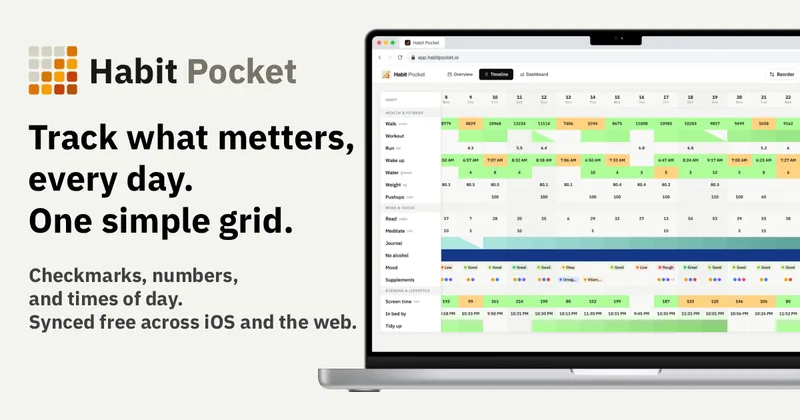
Habit Pocket is a multi-platform habit tracker that logs yes/no checks, numeric values, times, and categorical selections in a single grid, plus charts and AI integrations to reveal correlations between habits, sleep, mood, and energy.
Premium Alternatives
Writingmate
Writingmate is an all-in-one AI workspace that brings chat, files, web search, image and video generation, and 350+ third-party models (GPT, Claude, Gemini, Grok, Sora, Veo, etc.) into a single app designed for productivity, content, and team work.
gistreader
GistReader is a web-based read-it-later app that uses AI to summarize articles and remove distractions, supporting individual pages and RSS feeds while syncing content across devices.

Inbox Zero
Inbox Zero is an AI email assistant that organizes and labels inbox messages, drafts replies in the user's voice, and helps manage email from web, mobile, Slack, or Telegram. It works alongside Gmail or Outlook rather than replacing the email client.

AI Summarizer (summarizer.org)
AI Summarizer (summarizer.org) is a web-based AI-powered text summarization tool that shortens text while preserving main points, supporting text, DOCX, images and URLs, multiple output styles (paragraphs, bullet points), multiple languages, and optional premium features.

HigLabo Mail Agent
HigLabo Mail Agent is part of HigLabo, an AI-powered integrated workspace that organizes inboxes and automatically converts actionable emails into tasks to help teams and individuals reduce context switching and work more efficiently.