

Morgen
Morgen is an AI-powered planner and calendar tool that turns tasks and events into prioritized, time‑blocked daily plans across multiple calendars and task apps, with user-controlled suggestions via configurable "Frames".
Morgen is productivity software teams evaluate for productivity. Use this page to review pricing, integration signals, and the best alternatives before you commit.
Profile facts come from the vendor source. AiMatch labels unknown pricing or API details instead of estimating them.
Review official source →Used in These Packs
Quick Overview
Best for: Productivity
What it does
Productivity software for decision-makers comparing workflow fit and alternatives.
Best fit
Productivity
Pricing snapshot
Free
Next step
Compare Morgen with similar tools before you shortlist it.
Compare this tool before you shortlist it
Review alternatives, pricing posture, and workflow fit side by side.
Morgen is an AI Planner and calendar management product that converts tasks, meetings, and deadlines into prioritized, time‑blocked daily plans. The AI planning engine spans personal and work calendars, consolidates tasks from multiple tools, and recommends when to protect time for work deliverables, personal to‑dos, creative pursuits, and side projects. Plans are generated based on Morgen Priority Factor, user capacity, and configurable "Frames" (time blocks devoted to task types), and are only scheduled with the user's approval. The product also advertises an AI executive assistant (Kai) developed by the Morgen team.
Morgen is an AI-powered planner and calendar tool that turns tasks and events into prioritized, time‑blocked daily plans across multiple calendars and task apps, with user-controlled suggestions via configurable "Frames".
Own this listing?
Claim this page for a one-time $29 to add pricing, features, screenshots, verified owner details, and a clearly labeled 30-day category position after the profile is live.
Claim this listing for $29Key Features
AI Planner
Generates prioritized daily plans by turning tasks, meetings, and deadlines into realistic time blocks and recommending when to tackle them based on capacity and priority.
Frames (Time‑blocking templates)
Customizable blocks of time devoted to types of work (deep work, quick wins, personal to‑dos, learning) with filters to control which tasks are scheduled in each Frame and recurring patterns.
Multi‑calendar planning
Creates consolidated daily plans that span all your calendars to avoid double‑booking and protect time for chosen activities.
Integrations with task and project apps
Consolidates and prioritizes tasks from third‑party tools (Notion, ClickUp, Todoist, Linear, Obsidian, Microsoft To Do, Google Tasks, etc.) so they can be scheduled alongside calendar events.
Adaptive rescheduling & conflict handling
Detects conflicts, alerts you to disruptions, and can reprioritize or reschedule tasks with one click when events change.
Realistic time estimates & task splitting
Options to round up time estimates, split large tasks into multiple sessions, and adjust intensity/break frequency to create sustainable plans.
User‑controlled planning
Suggested plans are previewed and only scheduled with user approval; users can tune plans via toggles, sliders, moving Frames, adding/ignoring tasks, and adjusting estimates.
Notifications and deadline reminders
Notifies users of approaching deadlines, conflicts, and previously scheduled incomplete tasks so nothing is forgotten.
Pricing
Free trial available (the site advertises “Start Your Free Trial”); no specific plan prices are listed on this page.
Use Cases
Individual daily planning
Generate achievable daily plans that combine meetings, personal tasks, and work deliverables across multiple calendars.
Focused work and deep work sessions
Use Frames to reserve blocks for deep work, learning, or creative time and guide the AI to schedule appropriate tasks in those slots.
Managing side projects and multiple roles
Simultaneously generate personal, work, and side‑hustle plans across calendars to balance competing priorities.
Team scheduling and coordination
Support for team workflows and team scheduling (page references team features and integrations) for organizations and operators.
Integrations
Google Calendar / Outlook / Apple Calendar
Reads events and finds free time so tasks can be scheduled without double‑booking; keeps existing calendar as source of truth.
Notion
Import and prioritize Notion tasks so they can be scheduled by the AI Planner.
ClickUp
Consolidate ClickUp tasks into Morgen's planning engine.
Todoist
Schedule Todoist tasks into time‑blocked plans.
Linear
Include Linear tasks and metadata in scheduling decisions.
Obsidian
Import tasks from Obsidian for planning.
Microsoft To Do / Google Tasks
Support for tasks from Microsoft To Do and Google Tasks.
Benefits
Limitations
Frequently Asked Questions
What is an AI schedule maker?
Can an AI organizer work with my existing calendar?
How does AI planning differ from manual scheduling?
How does the AI Planner prioritize my tasks?
Can I use the AI Planner without Frames?
What tasks does the AI Planner schedule?
Can I still manually time block in Morgen?
Does the AI Planner update the plan as events come up?
Where can I share feedback on the AI Planner?
Getting Started
- 1 Step 1: Start a free trial or sign in to your Morgen account ("Start Your Free Trial", "Sign in").
- 2 Step 2: Connect your calendars and task apps (Google Calendar, Outlook, Apple Calendar and supported task sources).
- 3 Step 3: Configure Frames and filters, then run the AI Planner to preview and approve a time‑blocked daily plan.
Support
Docs / Roadmap
Visit Morgen's roadmap to view upcoming features and submit feature requests.
Community (Discord)
Join the Discord server to discuss product usage and provide feedback.
Message / Contact
Send a message to the Morgen team (site includes Contact us and a messaging option).
API
Compare Morgen with similar tools
See how it stacks up against alternatives
Related Tools
View all 113 →
Windrunner
Windrunner is an AI-powered project collaboration and work management platform that combines work items, decisions, blockers, evidence, and progress into a single shared workspace to help teams coordinate work and review AI-proposed updates.


threadfork
threadfork is a macOS native, on-device AI notetaker that records, transcribes, and organizes meetings locally on Apple Silicon — generating summaries, threads (commitments/decisions), entities, and semantic search without sending audio to the cloud.

Afterlid, guarded lid closed work for macOS
Afterlid is a native macOS menu‑bar app that keeps downloads, renders, backups, dev servers, remote access, and local AI agents running after you close the lid by offering guarded modes (Sleepy, Awake, Always On) with built‑in battery, thermal, heartbeat, and time limits.
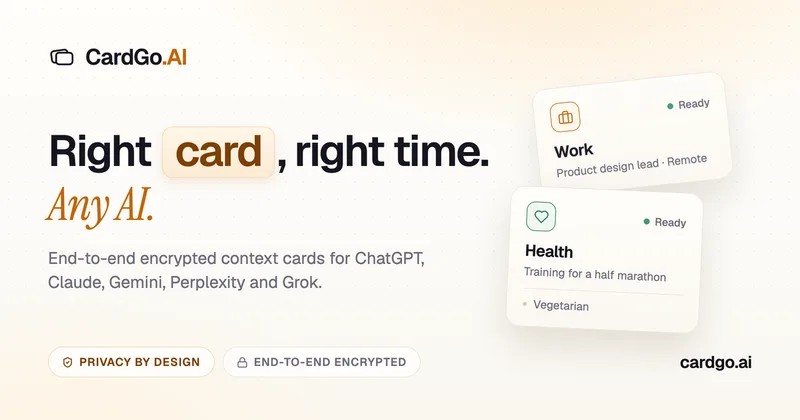
CardGo
CardGo is a Chrome extension and context-management product that stores small, reusable, end-to-end encrypted AI context “cards” you attach to chats (ChatGPT, Claude, Gemini, Perplexity, Grok) so multiple AI tools can access the right user context without sharing your full profile.
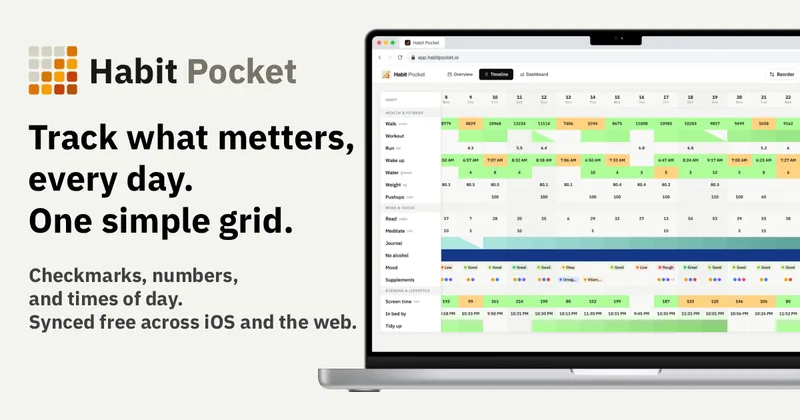
Habit Pocket
Habit Pocket is a multi-platform habit tracker that logs yes/no checks, numeric values, times, and categorical selections in a single grid, plus charts and AI integrations to reveal correlations between habits, sleep, mood, and energy.
Premium Alternatives

Inbox Zero
Inbox Zero is an AI email assistant that organizes and labels inbox messages, drafts replies in the user's voice, and helps manage email from web, mobile, Slack, or Telegram. It works alongside Gmail or Outlook rather than replacing the email client.
Writingmate
Writingmate is an all-in-one AI workspace that brings chat, files, web search, image and video generation, and 350+ third-party models (GPT, Claude, Gemini, Grok, Sora, Veo, etc.) into a single app designed for productivity, content, and team work.

AI Summarizer (summarizer.org)
AI Summarizer (summarizer.org) is a web-based AI-powered text summarization tool that shortens text while preserving main points, supporting text, DOCX, images and URLs, multiple output styles (paragraphs, bullet points), multiple languages, and optional premium features.
gistreader
GistReader is a web-based read-it-later app that uses AI to summarize articles and remove distractions, supporting individual pages and RSS feeds while syncing content across devices.

HigLabo Mail Agent
HigLabo Mail Agent is part of HigLabo, an AI-powered integrated workspace that organizes inboxes and automatically converts actionable emails into tasks to help teams and individuals reduce context switching and work more efficiently.