

Fabric
Fabric is an AI-first personal and team workspace that combines notes, documents, whiteboards, tasks, meeting recordings, deep search, and a built-in AI assistant to help you think, create, collaborate, and publish from a single library.
Fabric is productivity software teams evaluate for education & research. Use this page to review pricing, integration signals, and the best alternatives before you commit.
Profile facts come from the vendor source. AiMatch labels unknown pricing or API details instead of estimating them.
Review official source →Used in These Packs
Quick Overview
Best for: Education & Research
What it does
Productivity software for decision-makers comparing workflow fit and alternatives.
Best fit
Education & Research
Pricing snapshot
Freemium from Not listed on page
Next step
Compare Fabric with similar tools before you shortlist it.
Compare this tool before you shortlist it
Review alternatives, pricing posture, and workflow fit side by side.
Fabric is positioned as an intelligent, collaborative workspace that combines a persistent personal cloud (the Fabric Memory Engine) with an integrated AI assistant. It centralizes documents, whiteboards, meeting and voice notes, tasks, files, and recordings into a single searchable library that the assistant can reference. Fabric targets individuals and teams—researchers, students, designers, marketers, content creators, and developers—by offering cross-platform apps (web, iOS, Android, desktop, browser extension) and team-oriented features such as sharing, publishing, and analytics.
The product emphasises AI-driven capabilities: drafting, searching across a knowledge base, taking actions, and improving with usage via a memory engine. Fabric also highlights deep content search (text, video, audio, images, color and visual search), integrations with third-party services, and built-in security features including encryption and CASA Tier 2 evaluation.
Fabric is an AI-first personal and team workspace that combines notes, documents, whiteboards, tasks, meeting recordings, deep search, and a built-in AI assistant to help you think, create, collaborate, and publish from a single library.
Own this listing?
Claim this page for a one-time $29 to add pricing, features, screenshots, verified owner details, and a clearly labeled 30-day category position after the profile is live.
Claim this listing for $29Key Features
Personal AI Assistant
An AI collaborator that drafts documents, searches across your library, references selected files/folders, and performs actions. Users can choose from multiple underlying AI models (Gemini, OpenAI, Claude, and others) under one subscription.
Fabric Memory Engine
A personal memory layer that understands relationships between saved items so the assistant gets more capable as you add content.
Infinite Canvas & Whiteboards
Create visual boards to draw, moodboard, brainstorm and spread ideas across Fabrics content.
Notes & Documents
Minimal collaborative text editor for full documents and quick notes with embedding and linking between files and notes.
Meeting & Voice Notes
Record meetings and create notes that combine recordings with transcribed notes so you can search and reference moments.
Tasks & Reminders
Create tasks with priority, due dates, reminders, and connect tasks to files and folders.
Deep Search (Multimodal)
Search across your entire library by content, meaning, color, or visual similarity; search inside PDFs, slides, video/audio transcripts, and connected services like Google Drive, Figma, Notion, and Dropbox.
Annotations & Comments
Annotate directly on images, pages, slides, or files and leave feedback pinned to exact spots.
Publish & Analytics
Share or publish content internally or externally with link controls and see built-in analytics on who opened a link and how long they spent.
Integrations & Developer Tools
Connect Fabric to external AI agents and tools (Claude, ChatGPT), use MCP/CLI, Docs/API to build custom apps and integrations, and connect storage/services like Google Drive, Notion, Dropbox and Zapier.
Cross-platform Apps & Web Clipper
Available on web, iOS, Android, desktop, a browser extension and a web clipper to save content from the web.
Security & Encryption
Files encrypted in transit (SSL) and at-rest with AES-256; CASA Tier 2 compliant and offers password-protected files or folders.
Pricing
Try for $0 (the page advertises a free trial/onboarding offer). For teams the page references a 14 day free trial.
Individuals
Not listed on page- Personal AI assistant
- Cross-platform apps
- Fabric Memory Engine
Teams
Not listed on page- Team workspace
- Publish and sharing controls
- Built-in analytics
Use Cases
Research & Academia
Centralize papers, PDFs, notes and recordings; search by meaning across the library and find exact pages or lines in documents.
Design & Creative Work
Visual canvases, moodboards, color search and visual similarity search help designers find assets and keep work on-brand.
Productivity & Meeting Capture
Record meetings, produce meeting notes that combine transcripts and recordings, create tasks and reminders tied to files, and get AI recaps.
Developer & Integration Workflows
Connect Fabric to AI agents and external services, use CLI/MCP and API/docs to build custom automations and search from terminals.
Teams & Publishing
Collaborate in shared spaces, annotate and comment in-place, publish externally, and use built-in analytics for stakeholder links.
Integrations
Google Drive / Notion / Dropbox / Figma
Search and access files stored in these services from Fabric's single library.
Claude / ChatGPT / Other AI models
Connect your Fabric library to external AI agents and choose models from multiple labs under one subscription.
Zapier, YouTube, TikTok, Reels, Email
Fabric can index and work with content from various sources (videos, social clips, emails) and automate connections through integrations.
MCP / CLI / API / Docs
Developer-facing tools and APIs to search, capture, and build custom apps and integrations on top of Fabric.
Benefits
Limitations
No verified limitations are available.
Frequently Asked Questions
No verified FAQs are available.
Getting Started
- 1 Step 1: Try for $0 by signing up via the Fabric website (Try for $0).
- 2 Step 2: Download the Fabric apps (web, iOS, Android, desktop) or install the Chrome extension and web clipper.
- 3 Step 3: Connect or import files and services (Google Drive, Notion, Dropbox, Figma, etc.), invite teammates or start creating documents, whiteboards, tasks and meeting notes.
Support
docs
User guide and Docs linked on the site (User guide, Docs, Changelog).
blog/community
Blog, Published directory, Creator program and community resources referenced on the site.
API
Docs and API referenced on site ("Build custom apps and integrations. Docs API MCP CLI").
Compare Fabric with similar tools
See how it stacks up against alternatives
Related Tools
View all 113 →
Windrunner
Windrunner is an AI-powered project collaboration and work management platform that combines work items, decisions, blockers, evidence, and progress into a single shared workspace to help teams coordinate work and review AI-proposed updates.


threadfork
threadfork is a macOS native, on-device AI notetaker that records, transcribes, and organizes meetings locally on Apple Silicon — generating summaries, threads (commitments/decisions), entities, and semantic search without sending audio to the cloud.

Afterlid, guarded lid closed work for macOS
Afterlid is a native macOS menu‑bar app that keeps downloads, renders, backups, dev servers, remote access, and local AI agents running after you close the lid by offering guarded modes (Sleepy, Awake, Always On) with built‑in battery, thermal, heartbeat, and time limits.
CardGo
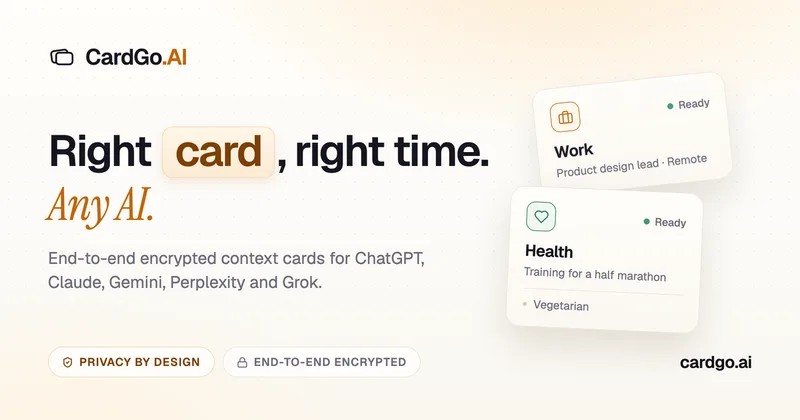
CardGo is a Chrome extension and context-management product that stores small, reusable, end-to-end encrypted AI context “cards” you attach to chats (ChatGPT, Claude, Gemini, Perplexity, Grok) so multiple AI tools can access the right user context without sharing your full profile.
Habit Pocket
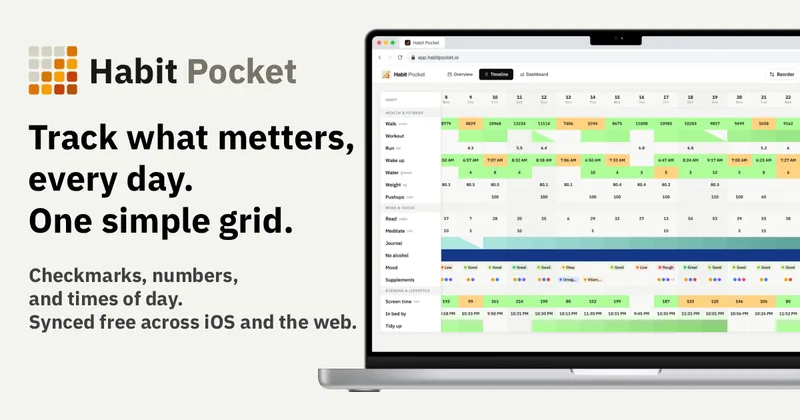
Habit Pocket is a multi-platform habit tracker that logs yes/no checks, numeric values, times, and categorical selections in a single grid, plus charts and AI integrations to reveal correlations between habits, sleep, mood, and energy.
Premium Alternatives

AI Summarizer (summarizer.org)
AI Summarizer (summarizer.org) is a web-based AI-powered text summarization tool that shortens text while preserving main points, supporting text, DOCX, images and URLs, multiple output styles (paragraphs, bullet points), multiple languages, and optional premium features.
Writingmate
Writingmate is an all-in-one AI workspace that brings chat, files, web search, image and video generation, and 350+ third-party models (GPT, Claude, Gemini, Grok, Sora, Veo, etc.) into a single app designed for productivity, content, and team work.

Inbox Zero
Inbox Zero is an AI email assistant that organizes and labels inbox messages, drafts replies in the user's voice, and helps manage email from web, mobile, Slack, or Telegram. It works alongside Gmail or Outlook rather than replacing the email client.
gistreader
GistReader is a web-based read-it-later app that uses AI to summarize articles and remove distractions, supporting individual pages and RSS feeds while syncing content across devices.

HigLabo Mail Agent
HigLabo Mail Agent is part of HigLabo, an AI-powered integrated workspace that organizes inboxes and automatically converts actionable emails into tasks to help teams and individuals reduce context switching and work more efficiently.